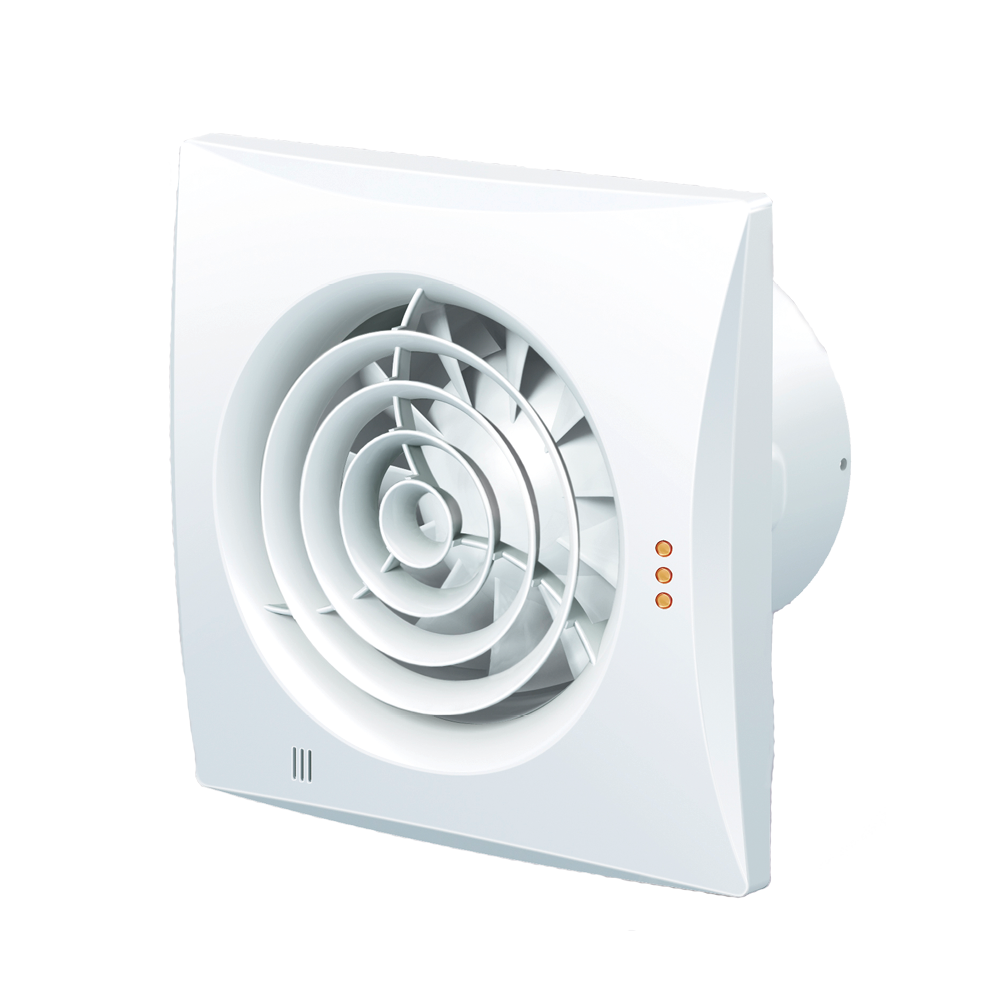
User manual for
Pro 32 & Pro 35
Ventilator for extraction
Content
NB! To ensure a long lifespan for the fan, the user manual must be followed.
All work related to the product’s connection, setup, servicing and repair must be carried out with the power grid disconnected.
Assembly and servicing are carried out only by persons who have the necessary authorization to work independently on electrical appliances with a voltage supply of up to 1000 V in accordance with this guide.
The single-phase network to which the product is connected must meet the requirements of applicable standards.
The fixed wiring system must contain an automatic circuit breaker. The fan must be connected to the mains via an automatic circuit breaker QF integrated into the fixed wiring system. The space between the circuit breaker contacts on all poles must not be less than 3 mm.
Inspect the fan for visible signs of damage to the blades, the casing, and the grille before installation; the casing must be free of foreign objects inside that could damage the blades.
Due to ongoing improvements in the fan's design, individual models may differ from those described in this guide.
During assembly, avoid pressure and pressure on the cabinet.
Deformation of the cabinet can contribute to damage to the wings and an increase in noise from the fan.
The product must not be used outside its intended use, and no modifications or changes may be made.
To prevent the penetration of smoke, coal and other combustible substances via a smoke trap or other antibrand measures, as well as to avoid the formation of reverse gas flow from appliances that use gas or open flame.
The air through the fan must not contain dust or other solid impurities, sticky substances, or fibrous materials.
Do not use the fan in environments that contain easily flammable or explosive materials and vapours, i.e. alcohol, gasoline, spray paint.
To ensure the most efficient air circulation, the air intake or exhaust of the fan must not be closed or blocked.
Do not sit on the fan and do not place objects on it.
The time relay circuit is under mains voltage.
Disconnect the power supply before changing the settings.
The delivery set includes a specially developed plastic screwdriver for adjusting the fan's setting parameters.
A plastic screwdriver must be used to change the delayed start time.
WARNING:
To avoid accidental activation of the thermal fuse, the product can be connected to the electrical supply through an external circuit breaker, such as a time relay. It must not be connected to the electrical network, which is automatically switched on or off by the electricity provider.
The product must not be used by children, as well as by persons with reduced physical, mental or sensory abilities, with limited expertise and experience, unless they are supervised or have been taught about the safe use of the product and are aware of the risks.
Children must not play with the product.
Children must not clean and maintain a fan without sufficient supervision by adults.
Damaged or old fans must be disposed of separately.
ProThe container must not be destroyed along with unsorted waste.
Read this guide carefully before continuing with the installation of the fan.
Compliance with the requirements of the guidance will ensure reliable operation and increase the product's lifetime.
Keep the user manual in a safe place for as long as you use the product.
DELIVERY PACKAGE
- Fan – 1 piece.
- Rawlplug screws – 4 pieces.
- Screwdriver – 1 pc. (only for models with humidity and time control)
- User guide
- Packaging box
SHORT DESCRIPTION
This product is an axial fan designed for extracting air from small and medium-sized residential spaces.
The fan can be connected to 125 and 150 mm ducts.
The fans with a diameter of 100 and 125 mm are equipped with a single-speed motor.
The fans with a diameter of 150 mm contain a motor with 2 speeds.
The fan is mounted with a shut-off valve. When mounted on the ceiling, this must be removed.
Pro 32 TH
The fan is activated when the humidity in a room exceeds a certain level, between 60 and 90%. After reducing the humidity to a certain level, the fan will operate for the short interval between 2 and 30 minutes, as the timer is set. The fan can be activated manually, e.g. using a light switch. After disconnecting the switch, the fan will operate for a short interval set by the timer, i.e. between 2 and 30 minutes.
Pro 35TH
The fan is started or set to a maximum speed between 0 and 2 minutes when the humidity in a room exceeds a certain level, between 60 and 90%. After reducing the humidity, the fan will operate in the short interval between 2 and 30 minutes, as the timer is set for.
Using the lighting switch, the fan can be started or set to a maximum speed. The fan is started for between 0 and 2 minutes, as the timer is set to.
After the switch is disconnected, the fan will continue to operate for the time period set by the timer between 2 and 30 minutes.
RULES OF OPERATION
The fan is suitable for connection to the mains electricity network using single-phase alternating current:
The Model Pro 32 must be connected to 220…240 V/50 HZ or 220…240 V/60 Hz, see the information on the label located on the pipe stud.
The Model Pro 35 must be connected to 220…240 V/50/60 Hz.
The fan is used at temperatures between +1 °C and +45 °C.
The fan is rated IP-45 for protection against water and contact with dangerous parts.
The fan does not need the ground connection.
RULES FOR TRANSPORT AND STORAGE
The transport can be carried out in the manufacturer's packaging.
ProThe product must be stored in the manufacturer's packaging at air temperatures between +5 °C and +40 °C and a relative humidity of less than 80%.
ProThe crucible must not be stored in a storage environment that contains dust, acid or base fumes.
GUARANTEE
5-year warranty against manufacturing and material defects. The warranty applies under the following conditions:
• The fan must be connected by an authorised electrical contractor. The invoice must be presented as documentation
• The fan is assembled/installed according to this operating and installation instructions and cleaned at regular intervals. The fan may only be installed indoors
• The fan is not used in vulnerable locations (e.g. in industry or other places where the fan risks being exposed to solvents, high levels of moisture or various gases, etc.)
The exhaust duct and the fan have been installed in accordance with local regulations.
INSTALLATION
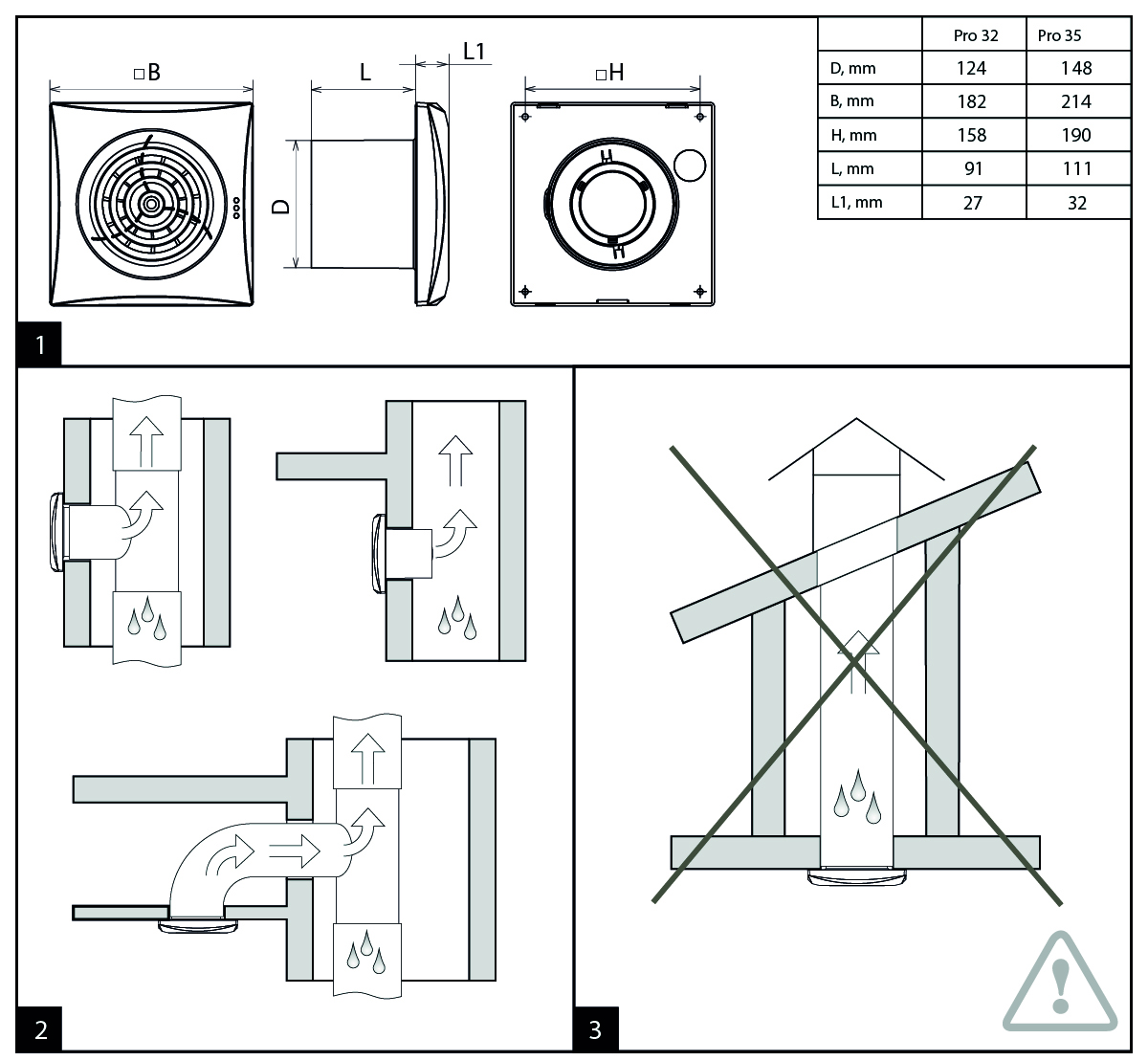
The fan is designed for vertical or horizontal mounting and with a connection to a round ventilation duct of the same diameter, see Figure 2. Important! If the fan is mounted vertically, it must be protected against the ingress of rain and condensation, Figure 2.
It is not permitted to install the fan with direct air blowing upwards, Figure 3.
Unless sufficient condensation insulation has been provided in accordance with applicable standards.
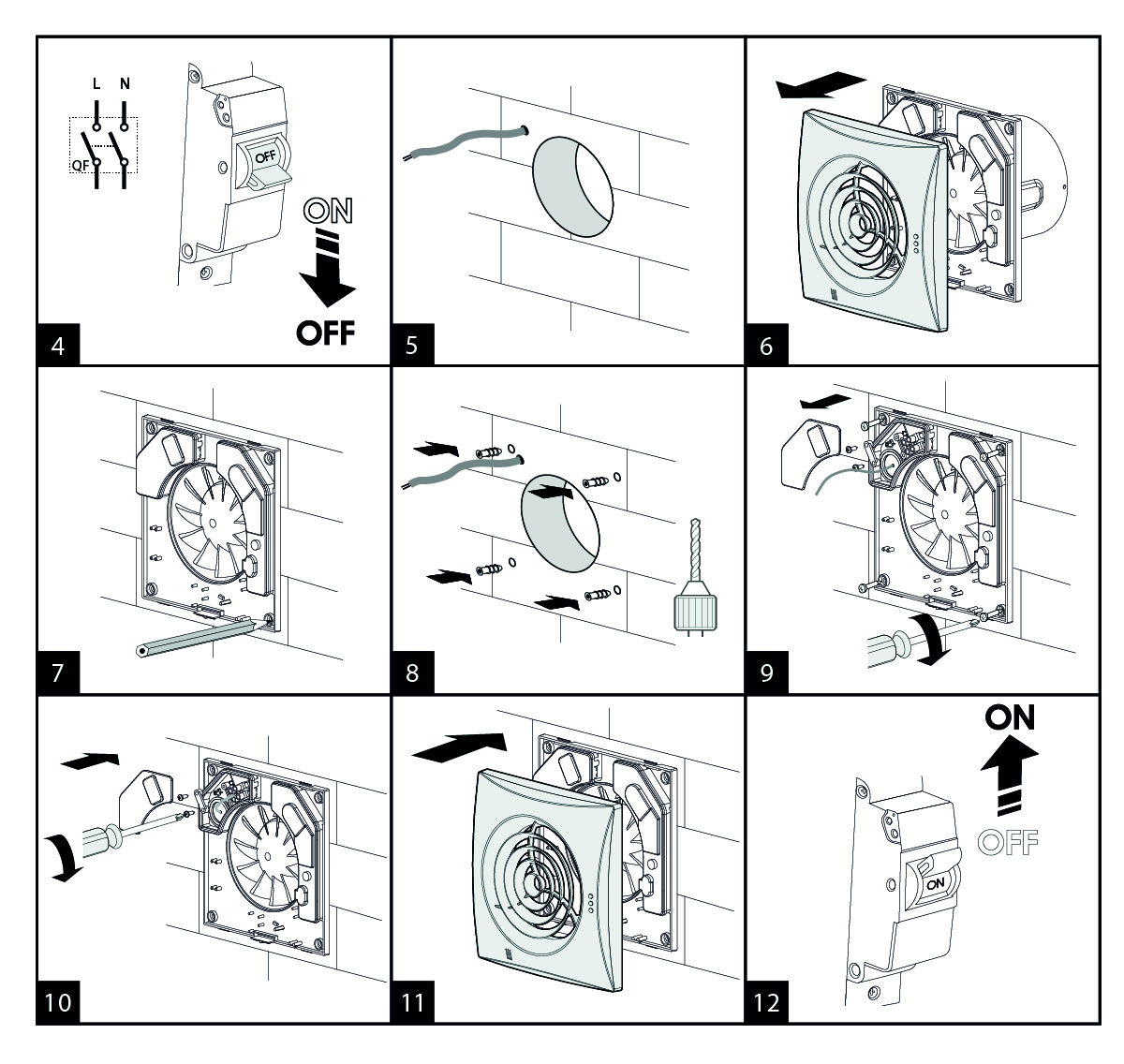
The mounting order of the fan is shown in Figures 4-12.
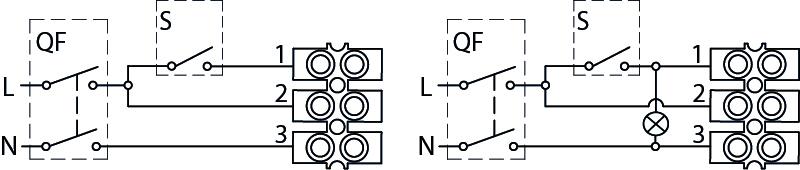
Connection diagrams for the electric grid are shown in Figures 13-15, 17-20 and 22-26.
Important! Only for Pro 35
It is not allowed to connect a power supply to terminals 1 and 2 at the same time (fig. 20)! The fan may break.
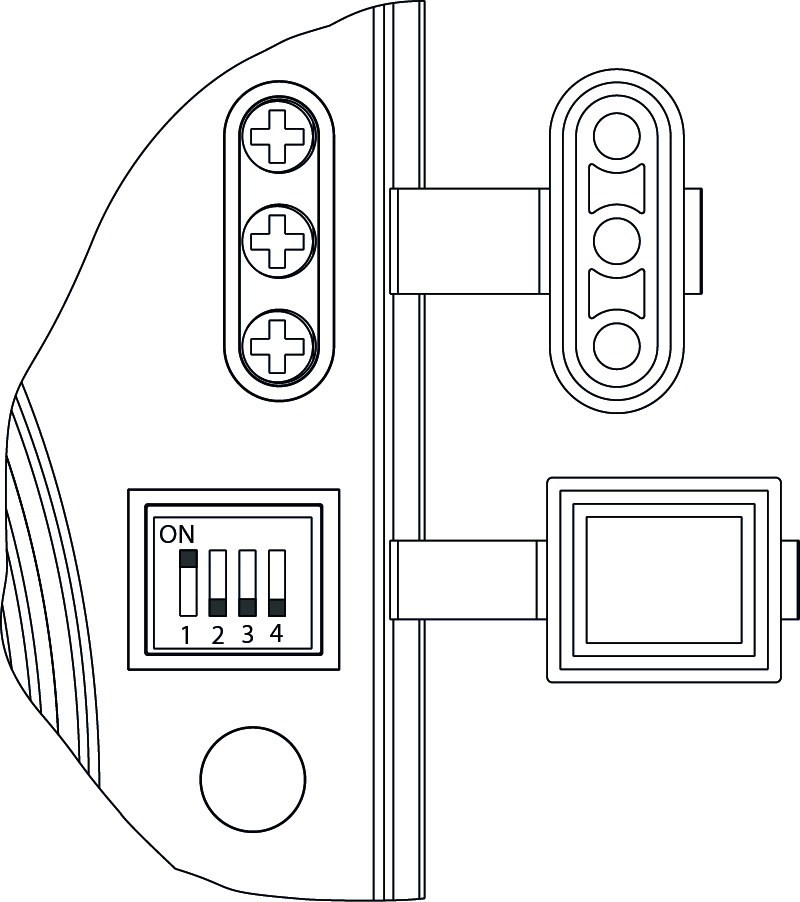
The selection of settings for the Pro 35 TH is shown in Figure 21.
The light indicator for Pro 35 TH is shown in Figure 28.
The time relay with delayed on and off, setting and adjustment of the humidity limit is shown in figures 17-19.
Important! Only for Pro 35 TH
If the time relay with delayed switching has been activated with an external switch, motion sensor, or an interruption of an action by the time relay has occurred, i.e., closing of the external switch, motion stop, drop in humidity below the set value, the fan remains in the previous operating condition.
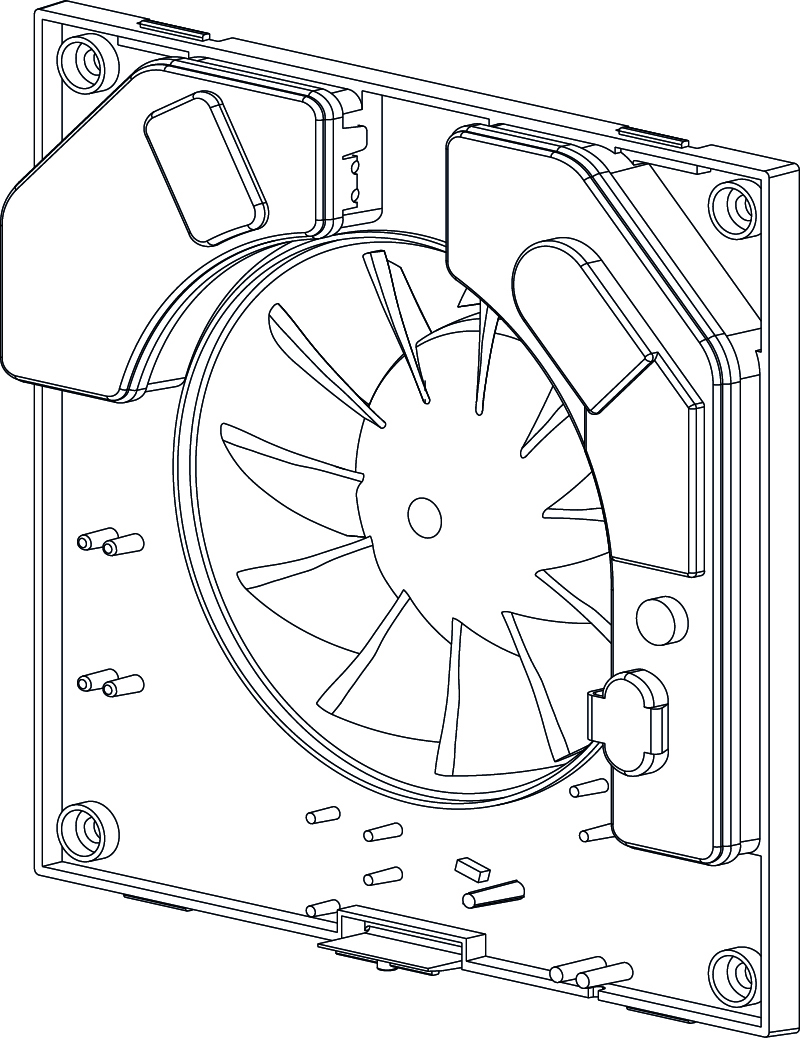
IMPORTANT – when mounting in a wall
When the extractor fan is mounted in the wall, it must be turned with the electrical connections upwards. See the figure below.
EL DIAGRAM/CONFIGURATION
Pro 32
13
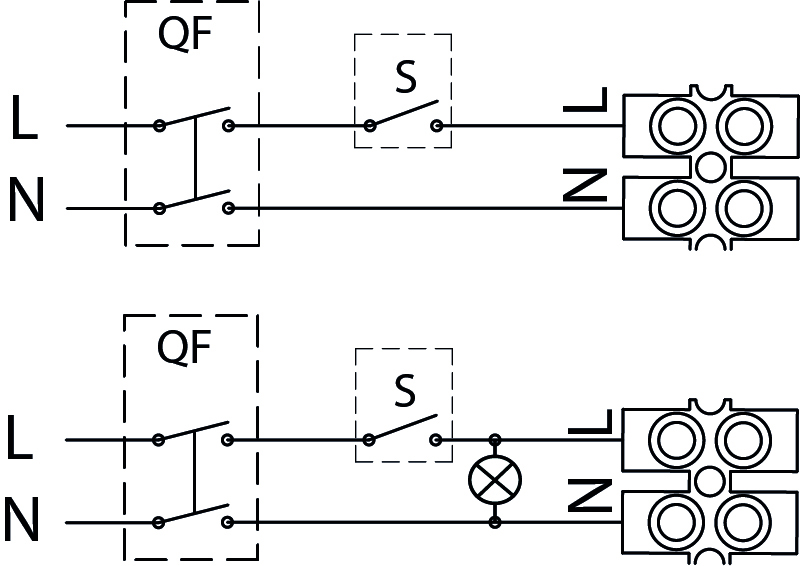
When you turn on the switch, electricity flows to the outlet, and the connected appliance starts up. On the model with a control light, the light glows when the power is turned on. When you turn off the switch, the appliance stops, and the control light goes out. The main switch can be used to cut off the power to the entire installation.
Pro 32 TH
15

The fan can be activated manually via the contact or automatically via the built-in humidity sensor.
When the humidity exceeds the set value, the fan starts automatically. It continues to run until the humidity is again below the set value. After that, the adjustable run time of 2–30 minutes is activated, after which the fan stops automatically.
When manually activated, the fan starts when the switch is turned on. When the switch is turned off, the fan continues to run if the humidity level remains too high. When the humidity drops below the set value, the standby time is activated. If the humidity is already below the set value, the standby time starts immediately.
In the installation with a control light, the light is illuminated while the power outlet is turned on.
16
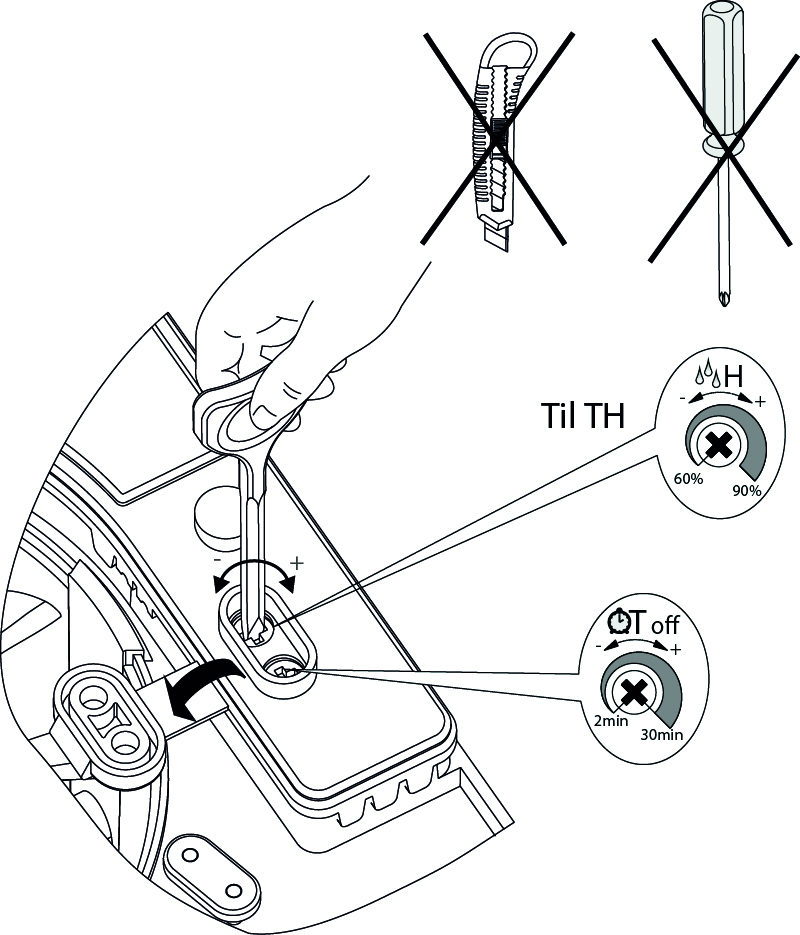
Adjustment of the start delay. Can be adjusted from 0 to 2 minutes.
Up: Turn the button clockwise (right)
Decrease: Turn the knob counter-clockwise (left)
Adjustment of the after-service allowance. It can be adjusted from 2 to 30 minutes.
Up: Turn the button clockwise (right)
Decrease: Turn the knob counter-clockwise (left)
Adjustment of the humidity. Can be adjusted from 60% to 90%.
Increase: Allow higher humidity, turn the knob counter-clockwise (right)
Lower: Allow less humidity, turn the knob counter-clockwise (left)
WARNING: When the timer needs to be adjusted, the power to the fan must be interrupted. Always use the included plastic screwdriver to adjust these 2 settings.
A metal screwdriver must never be used; it can damage the printed circuit board.
Pro 35
17
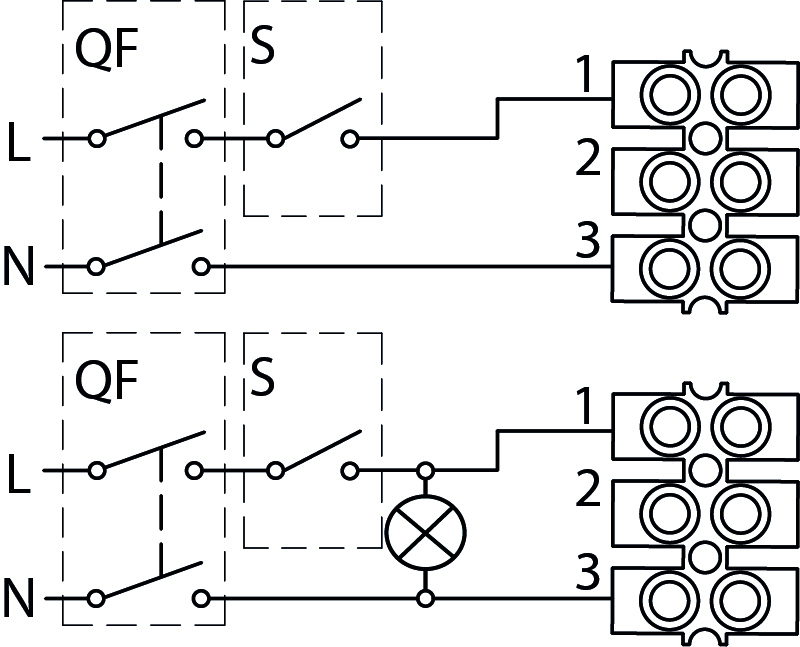
When the switch is turned on, the fan starts and runs at step 1. When the switch is turned off, the fan stops. In the installation with a control light, the light is illuminated while the switch is on.
18
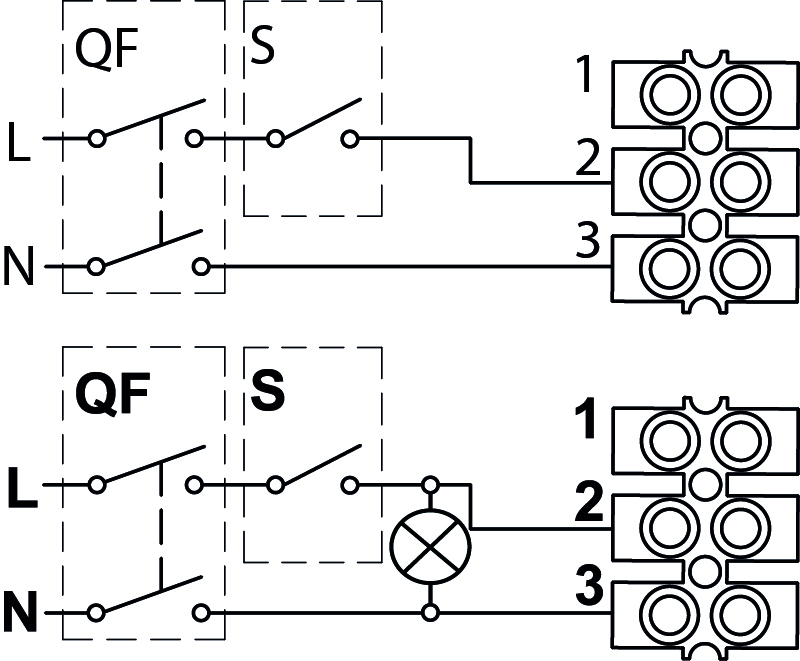
When the switch is turned on, the fan starts and runs at step 2. When the switch is turned off, the fan stops. In the installation with a control light, the light is illuminated while the switch is on.
19
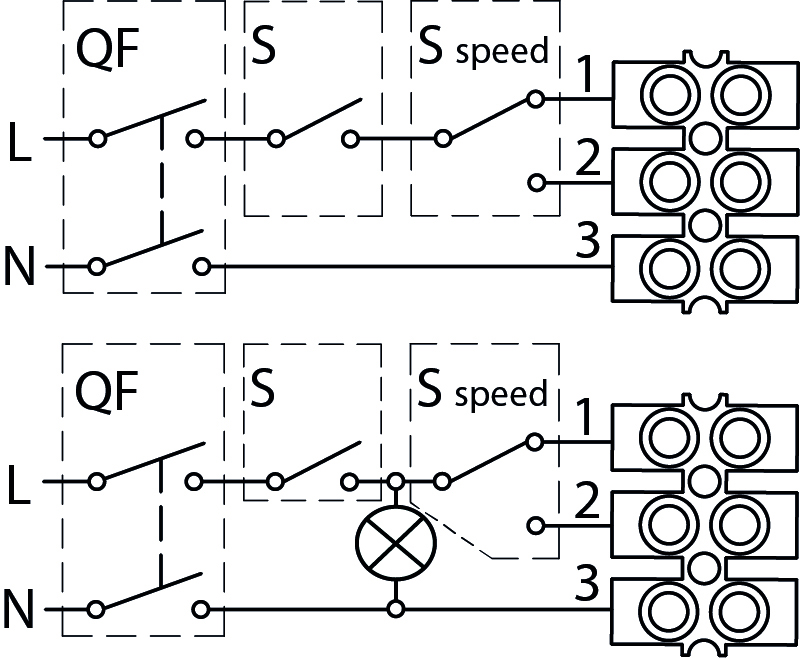
When the contact is turned on, the fan starts at the selected speed level. If the speed selector is set to position 1, the fan runs at level 1. If it is set to position 2, the fan runs at level 2. When the contact is turned off, the fan stops. In the installation with the control light, the light is illuminated while the contact is turned on.
20
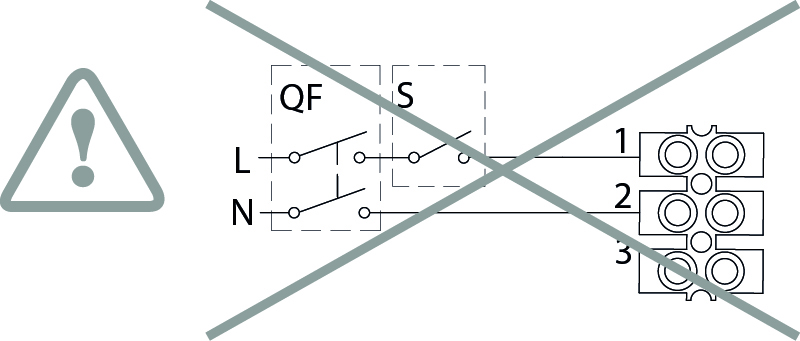
Pro 35 TH
The various settings are set using the DIP button.
Use the included plastic screwdriver to make the adjustment.
NOTE The factory setting is mode 1.
Connection
22
21
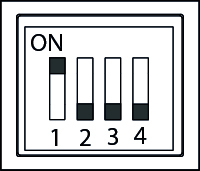
Mode 1 (one speed)
When the fan starts, it runs at step 1 speed.
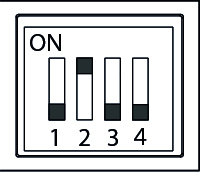
Mode 2 (one speed)
When the fan starts, it runs at step 2 speed.
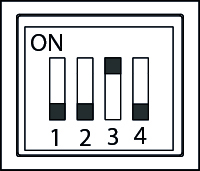
Mode 3 (two speeds)
The fan runs constantly at level 1.
When the contact is activated or the humidity rises, the fan runs at level 2.
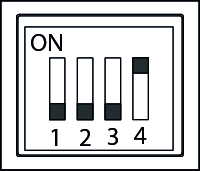
Mode 4 (two speeds)
When the switch is activated, the fan starts on stage 1. When the humidity rises, it runs on stage 2.
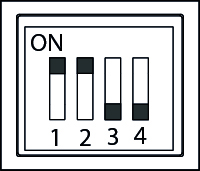
Mode 5 (two speeds)
If the contact is not turned on and the humidity rises, the fan starts at step 1 until the humidity is below the set value. However, if the contact is turned on and the humidity remains high, the fan starts at step 2 until the contact is turned off, then it goes back to step 1 until the humidity is below the set value.
NOTE The factory setting is mode 1.
Another setting can be made during installation or afterwards. If DIP is set to positions other than those mentioned here, a red warning light will illuminate. In such a case, the fan must be disconnected from the power supply, and the DIP button must be set to the correct position.
Mode 1
The fan can be activated manually via the contact or automatically via the built-in humidity sensor.
When the humidity exceeds the set value, a start delay of 0–2 minutes is activated. If the humidity remains too high after the start delay, the fan starts at step 1. If the humidity drops before then, the fan does not start. When the humidity is again below the set value, the fan continues in the set delay period of 2–30 minutes and then stops automatically.
When manually activated, the fan starts at step 1 after the start delay. If the power is turned off during the start delay, the fan does not start. When the power is turned off after startup, the fan continues if the humidity level is too high. When the humidity drops below the set value, the after-delay time is activated. If the humidity is already below the set value, the after-delay time starts immediately.
In the installation with a control light, the light is illuminated while the power outlet is turned on.
Mode 2
The fan can be activated manually via the contact or automatically via the built-in humidity sensor.
When the humidity exceeds the set value, a start delay of 0–2 minutes is activated. If the humidity remains too high after the start delay, the fan starts at step 2. If the humidity falls below the set value before that, the fan does not start. When the humidity is again below the set value, the fan continues for the set delay of 2–30 minutes and then stops automatically.
When manually activated, the fan starts at step 2 after the start delay. If the power is turned off during the start delay, the fan does not start. When the power is turned off after starting, the fan continues if the humidity level is too high. When the humidity drops below the set value, the after-delay time is activated. If the humidity is already below the set value, the after-delay time starts immediately.
In the installation with a control light, the light is illuminated while the power outlet is turned on.
Mode 3
The fan runs continuously as standard at step 1. It switches to step 2 when the power is turned on or when the humidity exceeds the set value.
With increasing humidity, a start delay of 0–2 minutes is activated. If the humidity remains too high after the start delay, the fan switches to step 2. If the humidity falls before then, the fan continues at step 1. When the humidity is again below the set value, the fan continues at step 2 for the set delay of 2–30 minutes and then switches back to step 1.
When manually activated, the fan switches to step 2 after the start delay. If the switch is turned off during the start delay, the fan continues on step 1. When the switch is turned off after activation, the fan continues on step 2 during the idle time. If the humidity remains too high, the idle time does not begin until the humidity has dropped to below the set value.
In the installation with a control light, the light is illuminated while the power outlet is turned on.
Mode 4
The fan is switched off by default. It can be activated manually at step 1 via the switch or automatically at step 2 via the built-in humidity sensor.
When the contact is turned on, a start delay of 0–2 minutes is activated. If the contact remains on after the start delay, the fan starts at step 1. If the contact is turned off during the start delay, the fan does not start.
When the power is turned off after startup, the fan continues at step 1 for the set after-run time of 2–30 minutes. If the humidity is above the set value, the fan switches to step 2. When the humidity is below the set value again, the fan switches to step 1, after which the after-run time starts. The fan stops automatically when the after-run time has elapsed.
If the humidity level rises while the fan is turned off, the start delay is activated. If the humidity level remains too high after the start delay, the fan starts at step 2. If the humidity level drops before then, the fan does not start.
In the installation with a control light, the light is illuminated while the power outlet is turned on.
Mode 5
The fan can be activated manually via the switch or automatically via the built-in humidity sensor. When activated, a configurable start delay of 0–2 minutes starts. If the activation ends during the start delay, the fan does not start.
When either the contact is turned on or the humidity exceeds the set value, the fan runs at step 1. If the contact is turned on while the humidity is too high, the fan switches to step 2.
When one of the two conditions ceases, the fan returns to step 1. When the power is turned off and the humidity is below the set value, the fan continues at step 1 for the set delay time of 2–30 minutes. After that, the fan stops automatically.
In the installation with a control light, the light is illuminated while the power outlet is turned on.
27
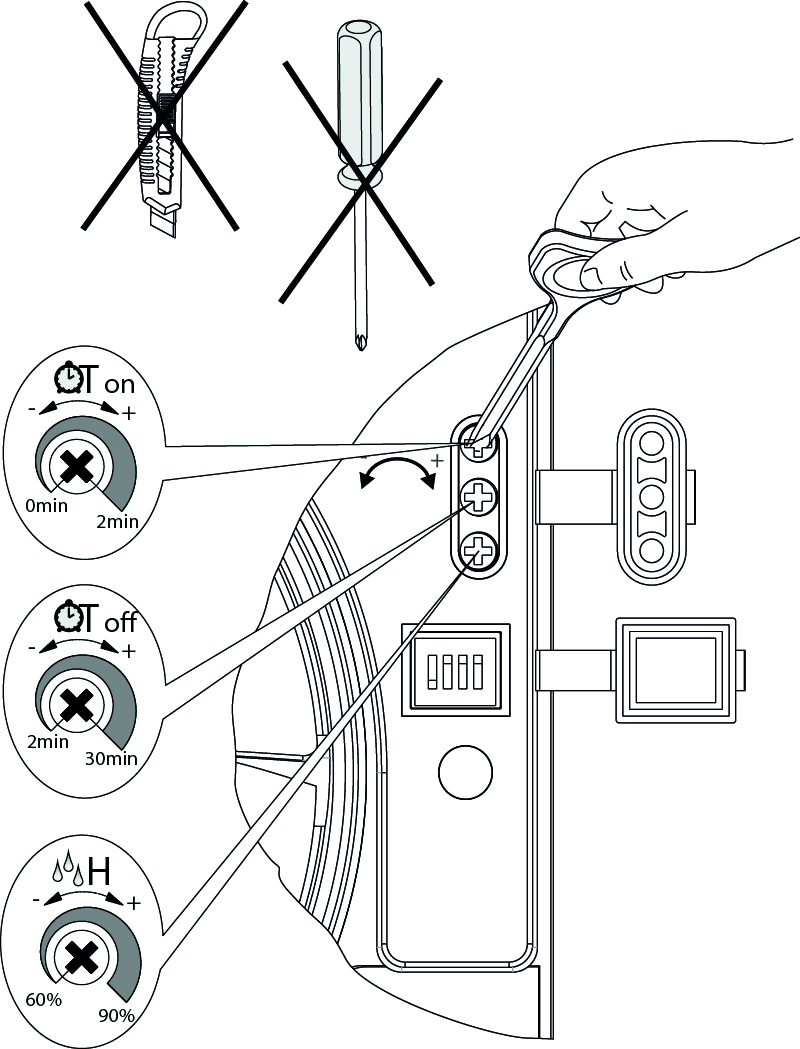
Adjustment of the start delay. Can be adjusted from 0 to 2 minutes.
Up: Turn the button clockwise (right)
Decrease: Turn the knob counter-clockwise (left)
Adjustment of the after-service allowance. It can be adjusted from 2 to 30 minutes.
Up: Turn the button clockwise (right)
Decrease: Turn the knob counter-clockwise (left)
Adjustment of the humidity. Can be adjusted from 60% to 90%.
Increase: Allow higher humidity, turn the knob counter-clockwise (right)
Lower: Allow less humidity, turn the knob counter-clockwise (left)
WARNING: When the timer needs to be adjusted, the power to the fan must be interrupted. Always use the included plastic screwdriver to adjust these 2 settings.
A metal screwdriver must never be used; it can damage the printed circuit board.
Light indicator for Pro 35 TH
28
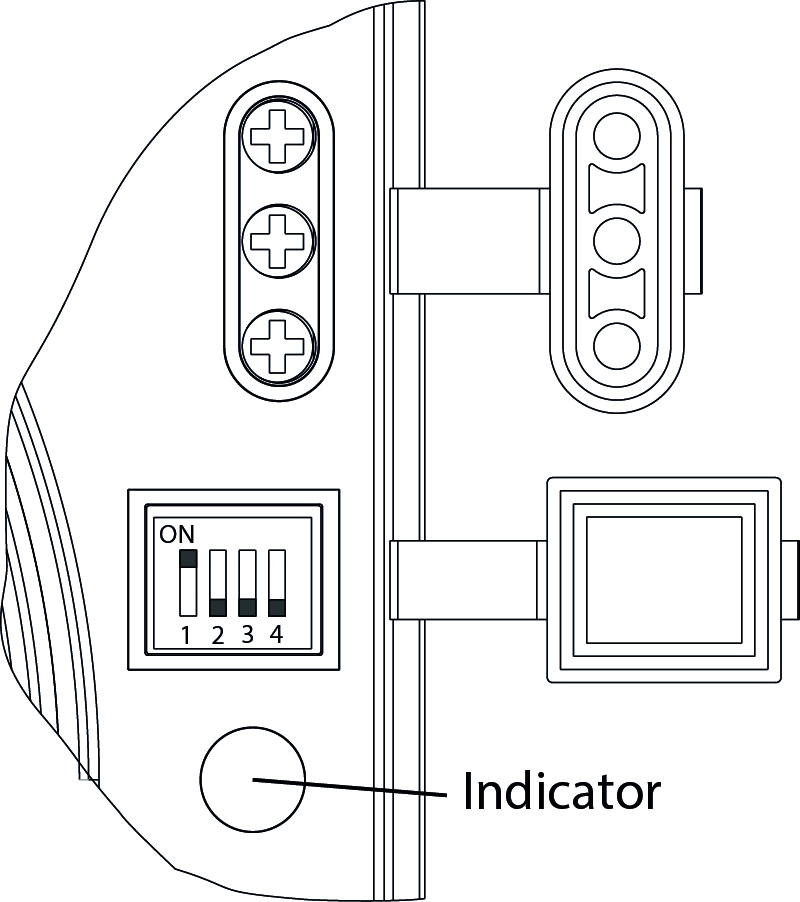
1. The light flashes green every 5 seconds: The fan is running without a signal from the sensor or the switched-on contact.
2. The light flashes green every second: The fan runs with the start delay activated.
3. The light is constantly flashing red: The fan is running with the humidity sensor activated.
4. The light is constantly flashing green: The fan is running with the power switch on.
5. The light flashes green and red every second: The fan runs at full speed.
CONTINUATION
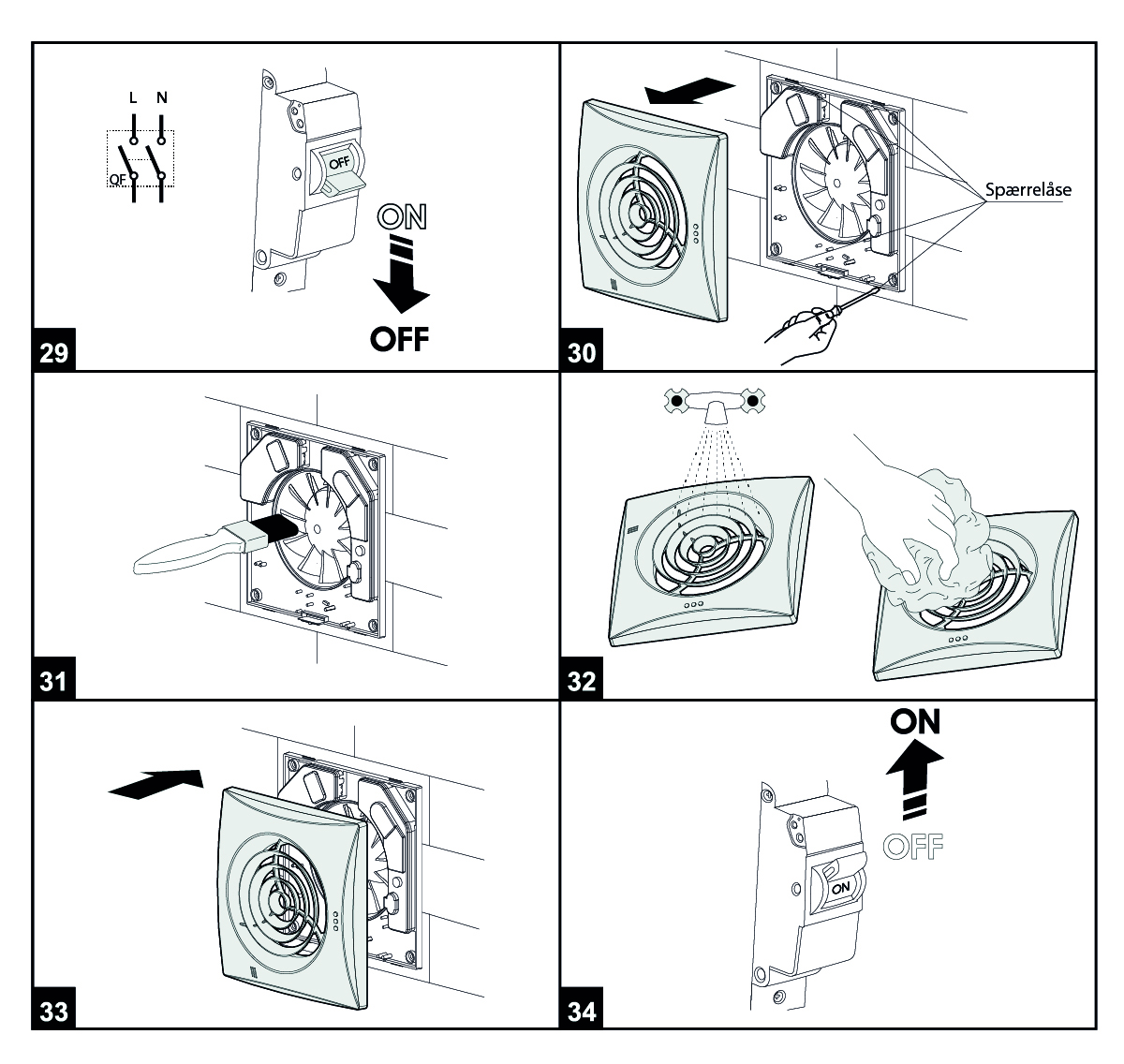
To disassemble the front, gently lift it with a screwdriver at the lock (picture 30).
A soft, damp cloth and a detergent that is moistened with water-based cleaning agent should be used (Figures 31-32).
WARNING! Avoid water getting on electrical components. The fan's surfaces must be completely dry.