






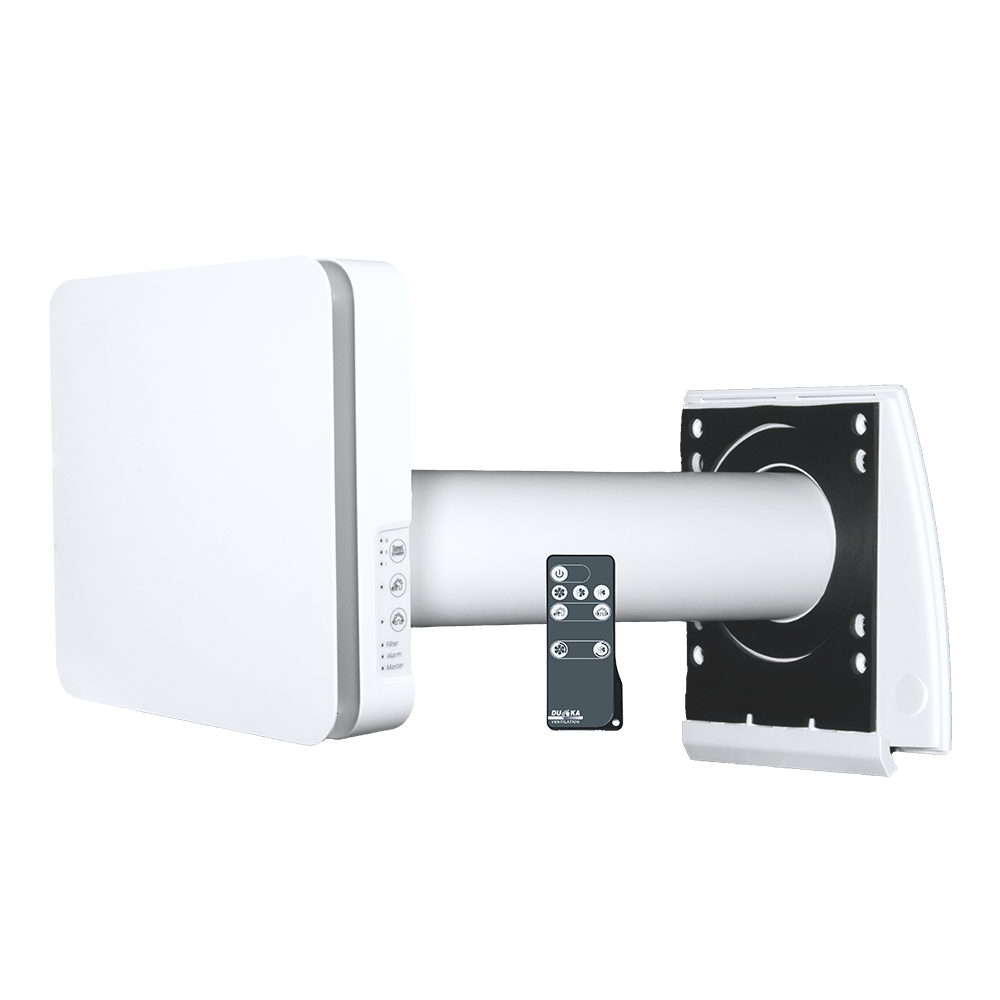
DUKA One Pro 25 S User Manual
Ventilation unit with heat recovery
Content
Transport and storage and Safety
- The device must be protected against shock, impact and weather conditions during transport.
- The device must be stored in its original packaging in a dry and ventilated room with temperatures between 5°C and 40°C.
- The storage room must not contain aggressive or chemical vapours or gases.
- Do not expose the stored device to pressure or any other form of stress.
How to use
- Only use the device for room ventilation. Do not connect tumble dryers or similar equipment to the device.
- The purpose of the unit is to provide basic ventilation in the home.
- The device may only be switched off if required by the authorities or for safety reasons - for example in case of fire or similar.
- The device cannot be used as a heat source.
- The device cannot be used as a dehumidifier.
- Keep explosive and/or flammable dust/vapour/liquid away from the device.
- The air to the ventilation unit must not contain evaporation of chemicals, coarse dust, soot, oil, adhesive substances, fibrous material, pathogens
or other harmful substances.
- Do not block the device channel when the device is in operation.
- Do not allow air flows from the device to be directed towards open flames or similar.
Before installation
- Read and understand the user manual before installing and using the device.
- Inspect the product for damage to the fan, core, front cover, electronics and outer screen. There must be no foreign objects
as this may damage the device.
- Save the quick guide so you can always quickly and easily access the latest manual via the QR code.
- In case the device changes ownership, please pass on the quick guide.
Mounting
- The unit is for installation in a facade wall.
- Carefully unpack the device.
- When mounting and installing the device, all applicable building, electrical and technical standards must be followed.
- Follow all electrical safety rules when installing the device. See more at the safety authority at www.sik.dk
- If any of the wires to the device become damaged, they must be replaced according to current regulations. See more at the Danish Safety Technology Authority at www.sik.dk
- Do not pressurise the device. Deformation of the device can result in motor blockage and excessive noise.
Operation
- Disconnect power to the device before installation, service, maintenance and repair. Except for filter changes, see section on maintenance.
- Do not use the device outside the specific temperature range indicated.
- Do not operate or service the device, controller or remote control with wet hands or bare feet as this may result in electric shock.
- Do not allow children to operate the device. Children should be supervised so they do not play with the device.
- Improper use of the device or unauthorised modifications are not permitted.
- The device should not be operated by persons with reduced physical, sensory or mental capabilities or lack of experience and knowledge unless they are
supervised or have received instructions on the use of the device from a person responsible for their safety.
Cleaning services
- Do not wash the device in water.
- Protect electrical parts from water.
Warranty terms and conditions
DUKA Ventilation offers a 24-month warranty from the date of purchase, cf. the Danish Sale of Goods Act. In addition, DUKA Ventilation offers an additional 12 months
warranty, provided that all described requirements regarding transport, storage, use, installation, operation, maintenance and warranty regulations are met
complied with.
To maintain the warranty, it must be documented that the filters have been changed at least once a year with DUKA Ventilation original filters.
Therefore, keep the receipts for these purchases.
Note: Depending on the environment, it may be necessary to change the filters more often.
The purpose of the unit is to provide basic ventilation in the home.
The device may only be switched off when required by the authorities or for safety reasons, for example in case of fire or similar.
If the device is installed where there is a risk of mould, the device must be cleaned particularly thoroughly to remove dust and fungal spores. This can be
It is necessary to use a special cleaning agent. Failure to do so will invalidate the warranty.
The warranty does NOT cover:
- The periodic maintenance.
- Device setup, adjustment and disassembly.
The warranty is void if:
- Information regarding transport, storage, use, installation, assembly, operation, maintenance and warranty regulations have not been observed.
- The device is used or placed in wet rooms or environments for which it is not designed.
- The unit has been switched off, with no outside air blockage required by the authorities.
- There is damage caused by the effects of mould.
- Visible damage has been applied to the device.
- The device is connected to a different type of power network than described in the manual.
- Damage occurs due to voltage fluctuations in the power grid.
- Non-original filters have been used in the device.
- Technical components have been added or removed in the device.
- Unauthorised repairs have been made to the device.
- The device is faulty due to force majeure (lightning, fire, flood, earthquake, etc.).
- No receipt can be presented for the purchase.
- The warranty has expired.
For complaints, please fill out our online complaint form at: www.dukaventilation.dk/reklamation
DUKA Ventilation cannot be held liable for warranty obligations performed without prior agreement with DUKA Ventilation.
For other conditions, please refer to Vink Plast's General Terms and Conditions of Sale and Delivery. The latest version can always be found on our website:
www.dukaventilation.dk
Technical Information
The device is designed for indoor use in temperatures from 1°C to 40°C and relative humidity up to 80 %.
The supply and extract air must be between -15 to 40°C.
The device must run continuously.
Electrical apparatus classification: Class II
IP rating: IP 24
The device is under constant development and therefore slight variations may occur in the technical data and user manual. The latest
Documentation can always be found using the QR code on the included Quick Guide or at www.dukaventilation.dk
Contents of the box
- Front cover and electronics (single component)
- Silencer
- 500 mm pipe
- Mounting cable
- Storm shield and drip tray
- Core
- Mounting kit
- Remote control
Structure
The DUKA One unit consists of front cover, electronics part, core where the ceramic exchanger and motor are located, silencer, filters, drip tray,
storm shield and wall bushing. On the inside is the electronics section with front cover. In the wall is the wall bushing in which the core
and the silencer are located. The filters are located at each end of the core, where they filter dust and other particles from the air flowing through. On the
On the outside is the storm shield that protects the device from wind and rain.
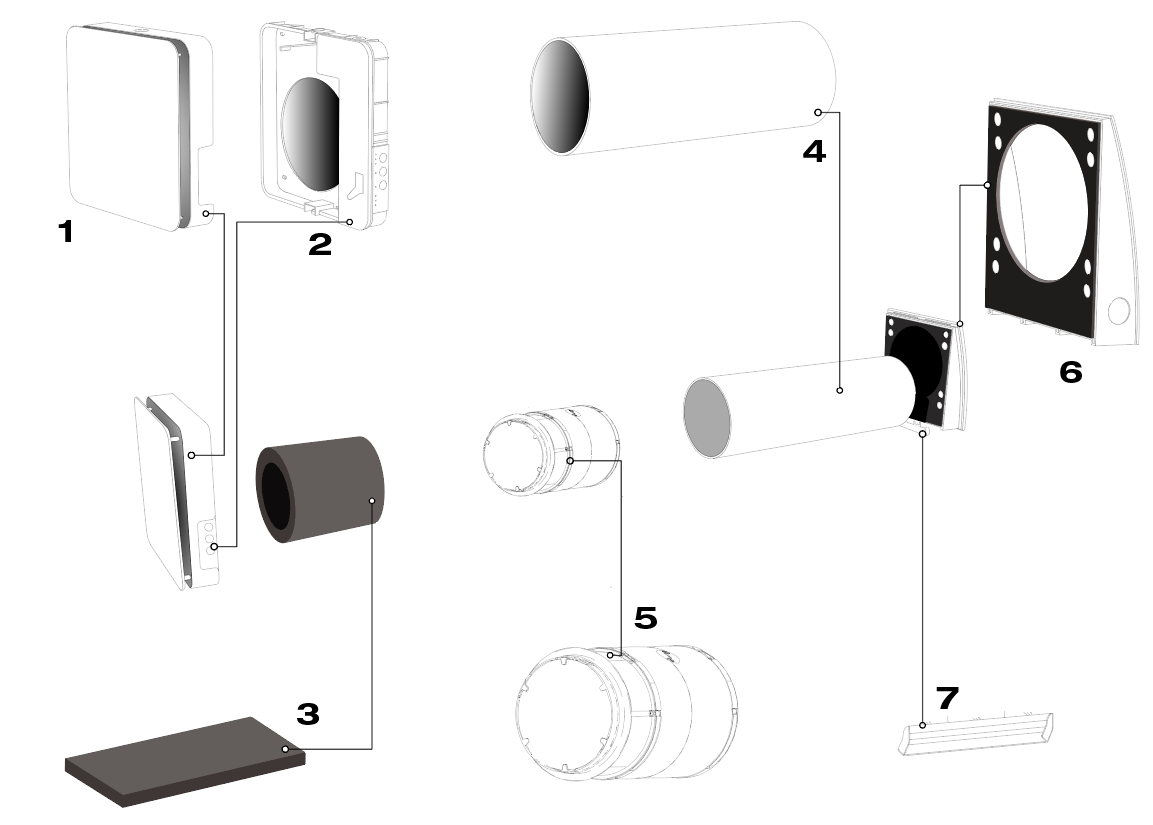
1- Front cover
Can be adjusted in the air intake
Direction according to personal needs.
2 - 1TP7Electronic part
With panel for setting the
unit
3 - Sound insulation
Reduces noise from the engine and
From the outside.
4 – Recessed conduit
Must have a 3 mm drop out
to allow condensation to run out
5 – Low-energy motor and ceramic core
Quiet engine with low noise level
Consumption
Recovers up to 90% of
the heat
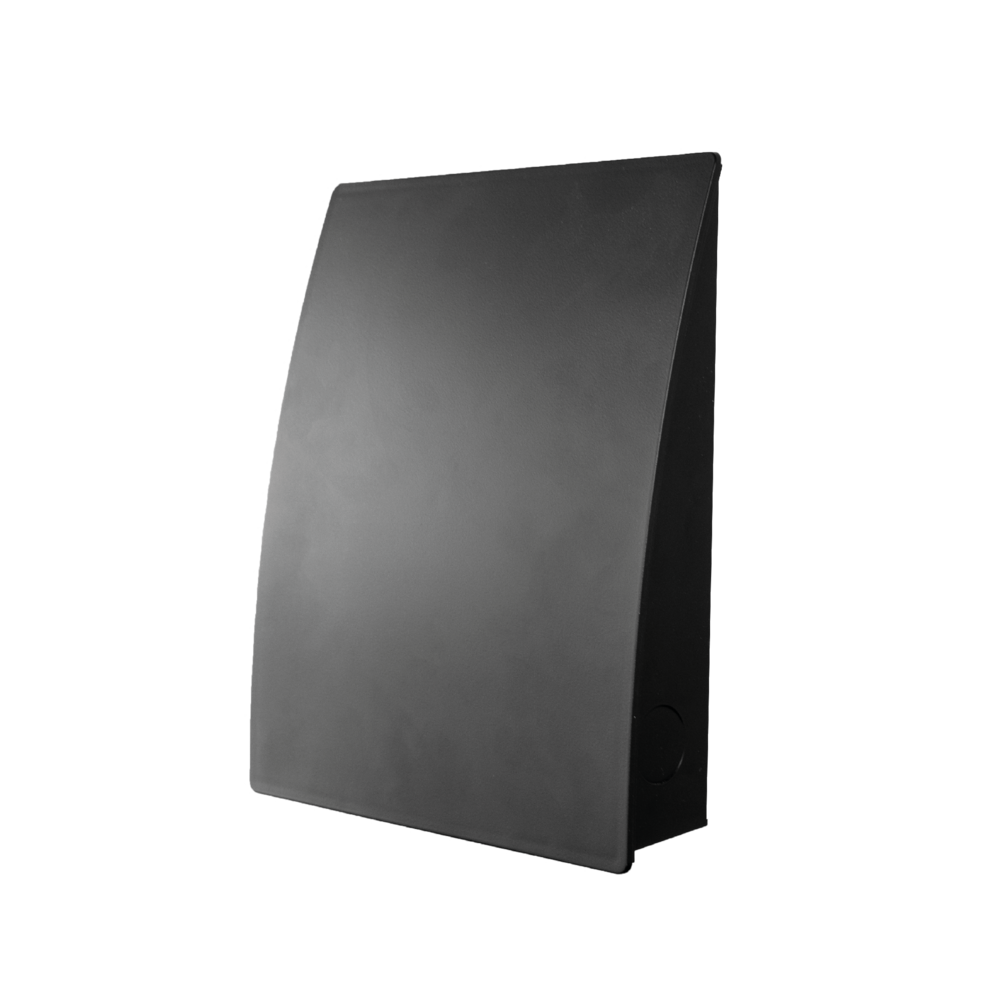
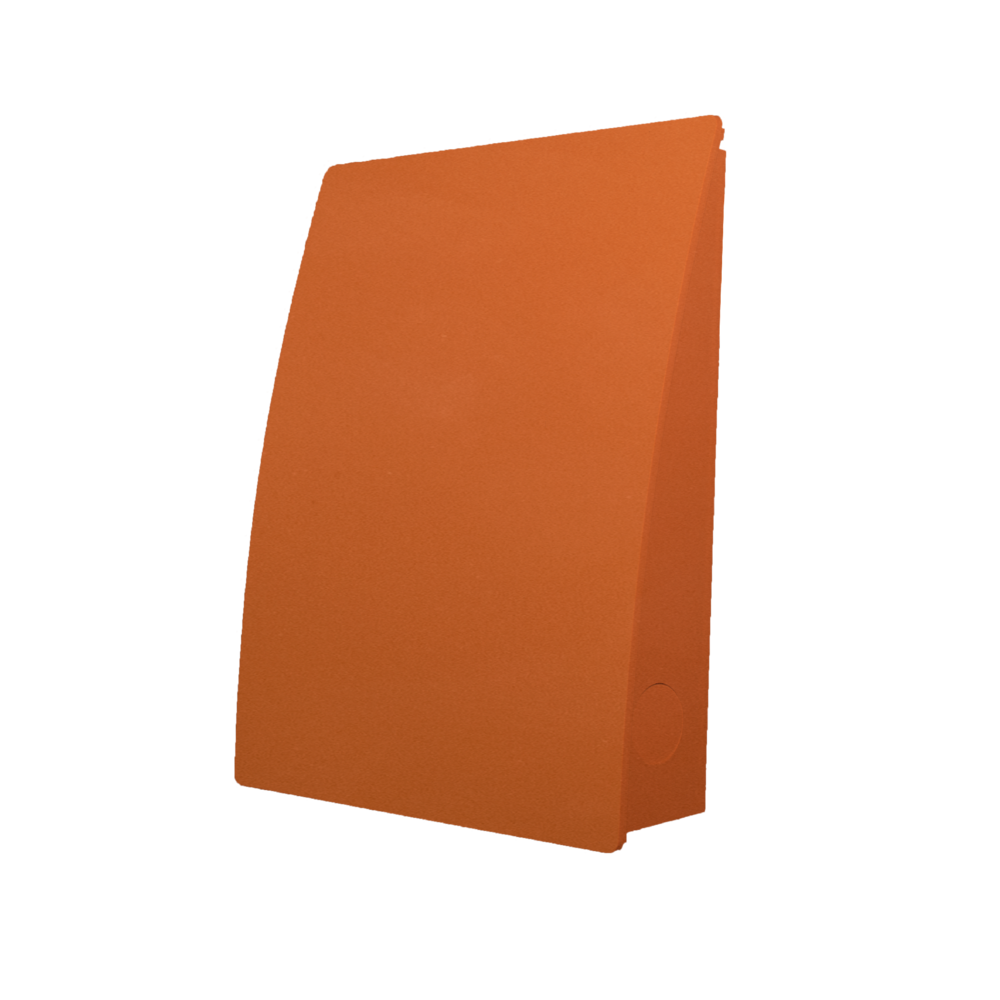
6 - Storm screen
Available in multiple colours.
7 - Dry screen
Reduces drip marks
from condensation

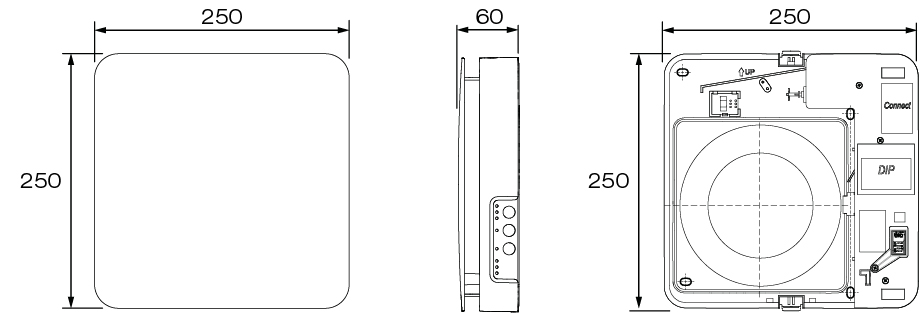
Dimensions
Indoor unit
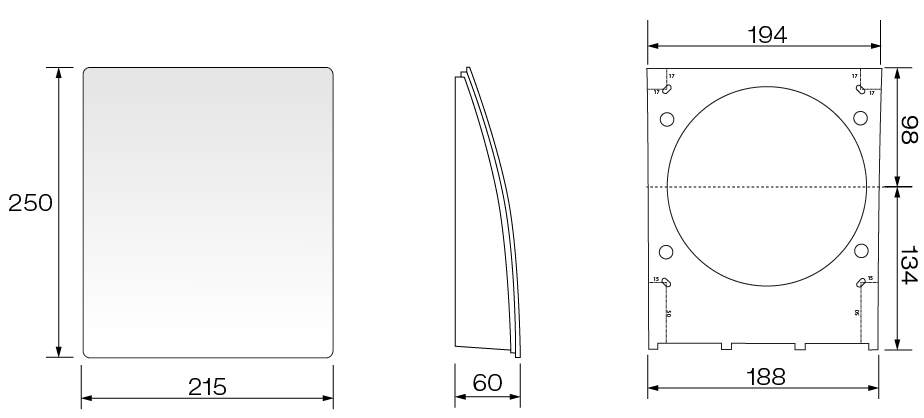
Storm shield
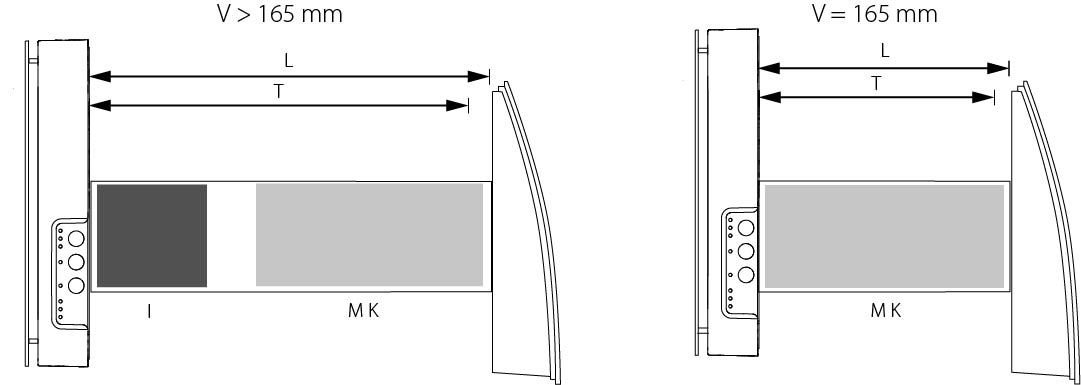
Minimum wall thickness for mounting of DUKA One Pro 25 S
If the wall thickness is below the minimum requirement, it is recommended to purchase DUKA One Spacer.
Recommended distance between motor and core is 60 mm as this provides optimal heat recovery.
Position of the core in relation to the wall thickness:
Hole diameter (for mounting) 105-125 mm
Length of ceramic core and motor 165 mm
Minimum wall thickness 165 mm
- V = Wall
- L = Channel length
- T = Wall thickness
- I = Sound insulation
- M = Motor
- K = Core
Mounting
1 - Determine location and drill hole through the wall.
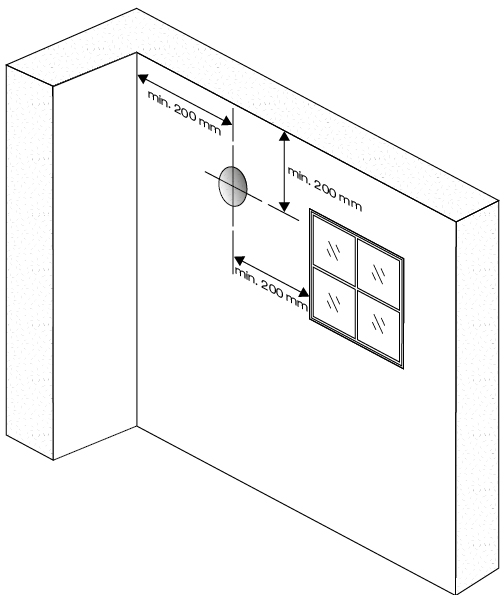
Before positioning the device, make sure to consider the following
Minimum distances to sidewall, ceiling and windows. Minimum distances
is shown in the drawing.
Don't forget to take into account the power supply for the device
when choosing a location.
For basement installation, it is recommended that the DUKA One unit
Positioned so that there is at least 0.3 - 0.5 m from the underside
of storm shield to terrain.
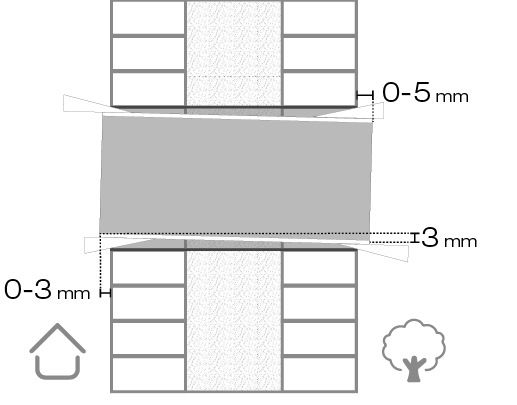
2 - Place the pipe in the hole and adjust the length to the wall thickness.
It is important that the pipe is installed with the prescribed drop of
3 mm, as it ensures that any condensation runs off
away from the electrical components of the device and out to
Storm shield.
For easy installation, it is recommended to use the included
polystyrene wedges.
The pipe must not protrude more than 3 mm on the inside and
5 mm on the outside.
3 - Use the included template for easy marking of required drill holes for mounting and entry for hidden cabling.
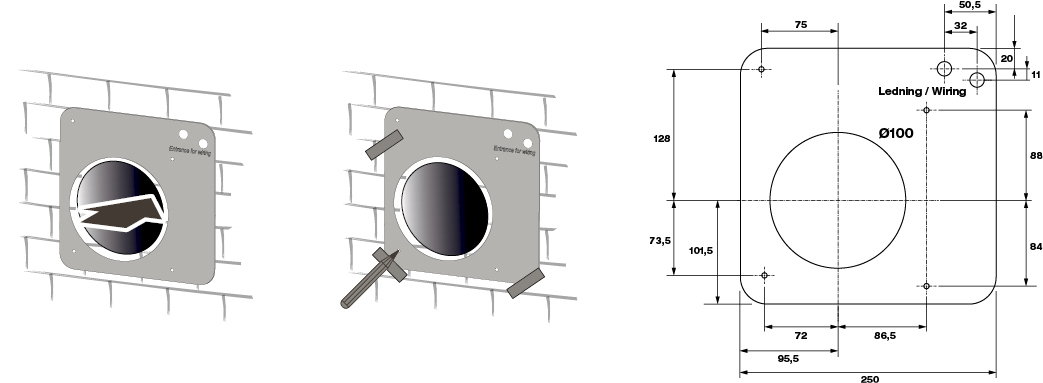
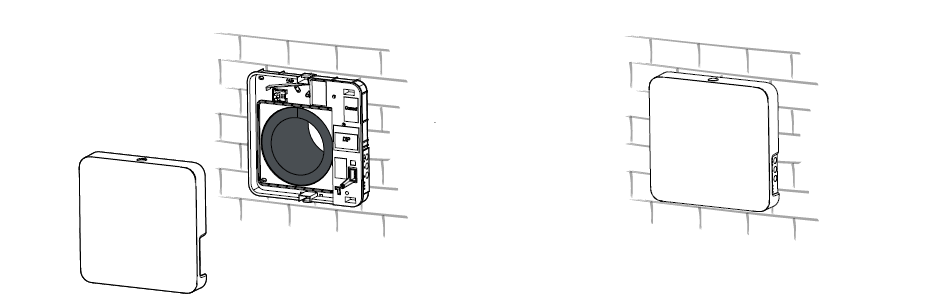
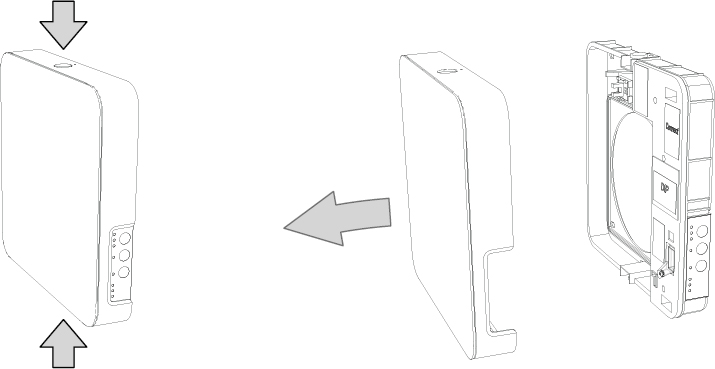
4 - Remove the front cover by pressing the buttons on the top and bottom.
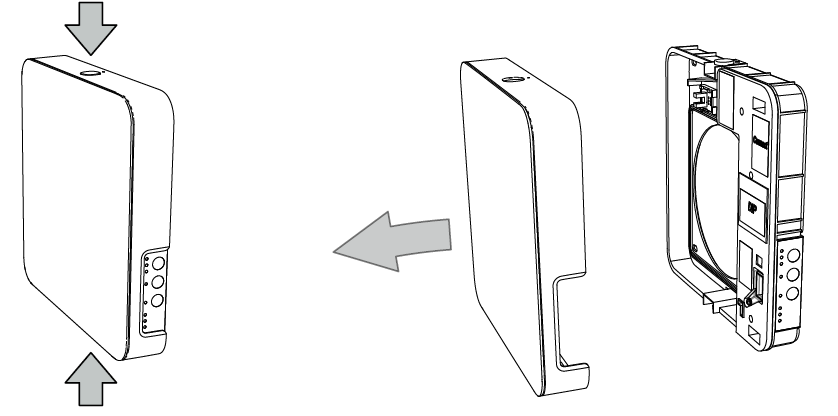
5 - Mount the electronics with the supplied screws and remove the left cover plate.
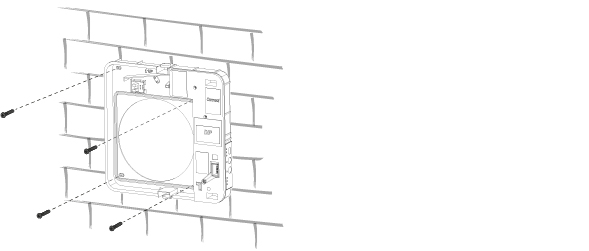
6 - Connect the cables according to the electrical diagram and route them as shown below. Remember to relieve the cables with the cable clamps.
A = Wire input
B = Cable clamps
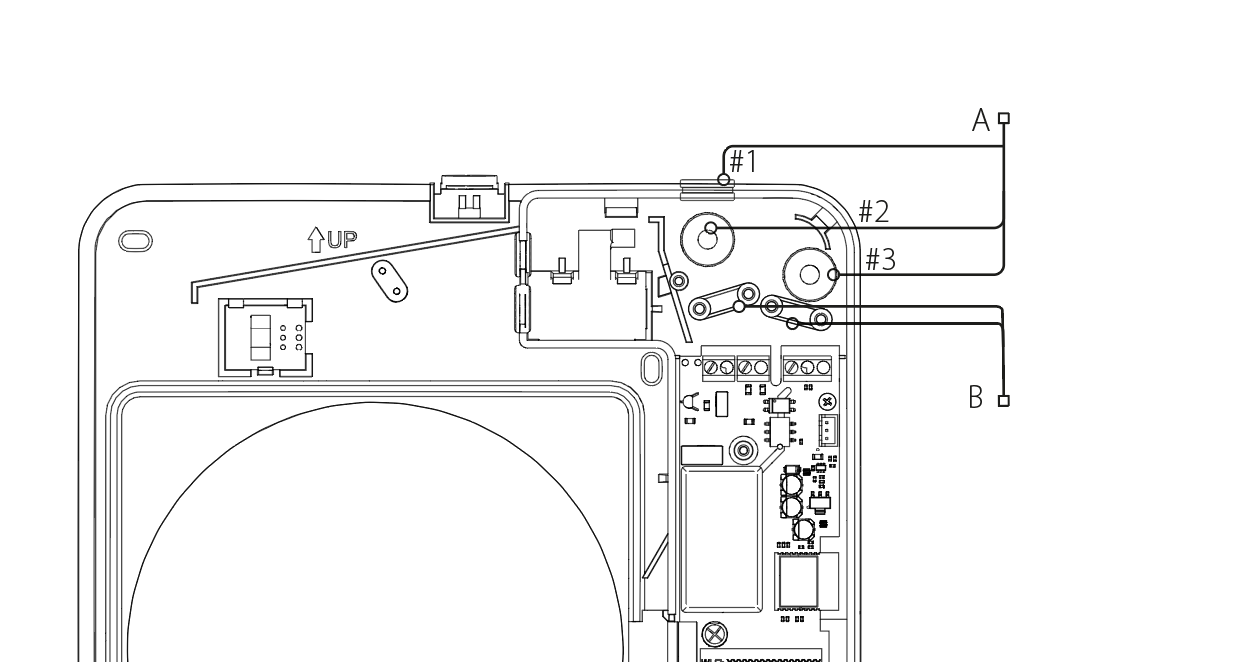
If input #1 is used on the top of the device, use the supplied cupboard template located in the centre of the mounting template,
Use to mark the notch. Drill out the notch so the cover can be easily attached and removed from the device.
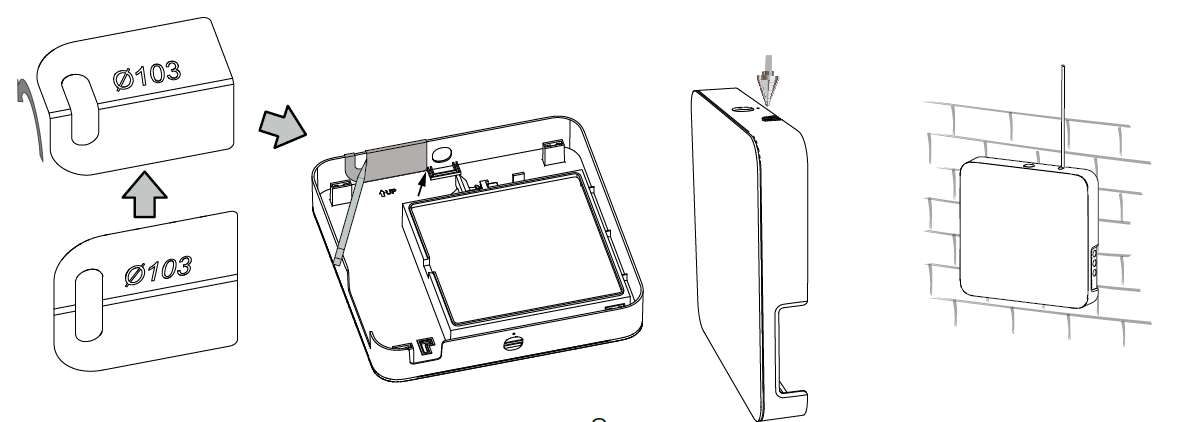
7 - After connecting the device's power supply, mount the cover plate.
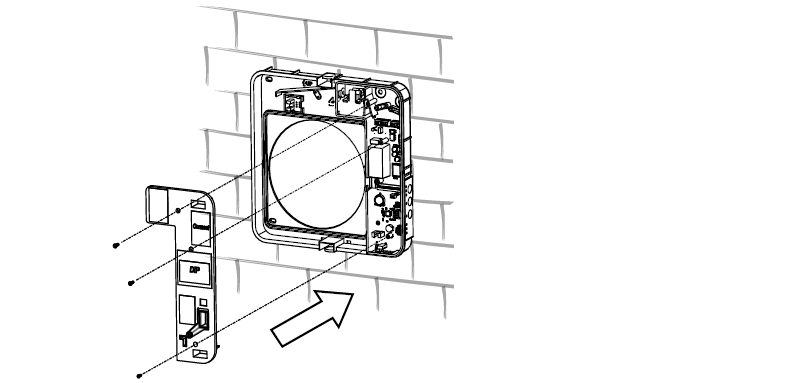
8 - Place the core in the pipe
Place the core in the pipe and then slide the motor in. Recommended distance between core and motor is 60 mm for optimal heat recovery.
See placement of parts in the section: Dimensions
Connect the motor to the electronics with the green connector.

9 - Place the silencer in the pipe
Place the silencer in the pipe and roll it to fit the pipe diameter. Shorten the silencer to fit the wall thickness with the core in the pipe towards
exterior side. The silencer is installed loosely so that it can be removed during maintenance of the unit.
10 - Mount front cover
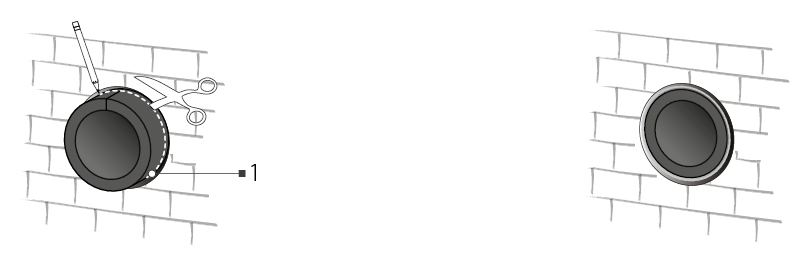
11 - Remove the cover of the storm shield before installation
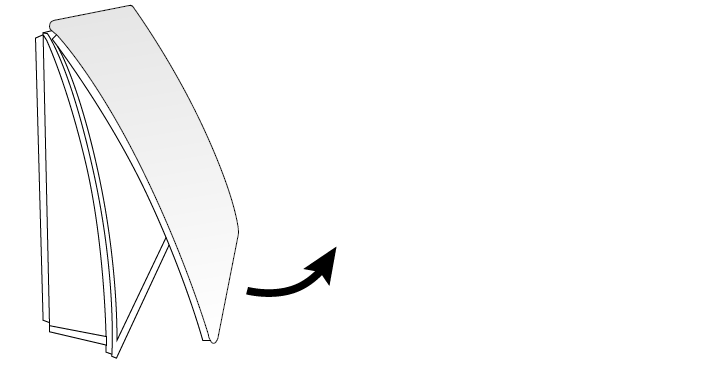
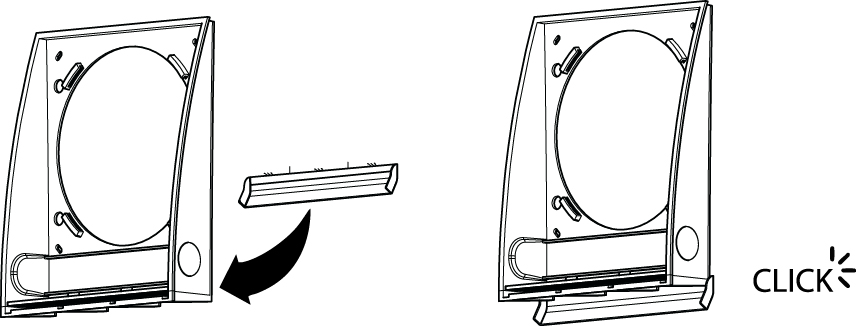
12 - Install storm shield with plastic drip tray
The included plastic drip tray must be clicked onto the back of the storm shield. The drip tray ensures that condensation is directed away from
walls.
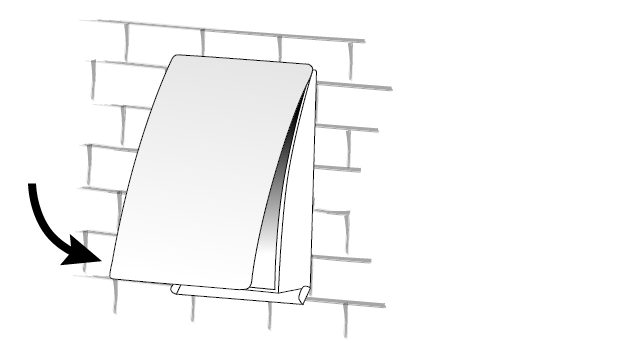
13 - Mount the cover on the storm shield
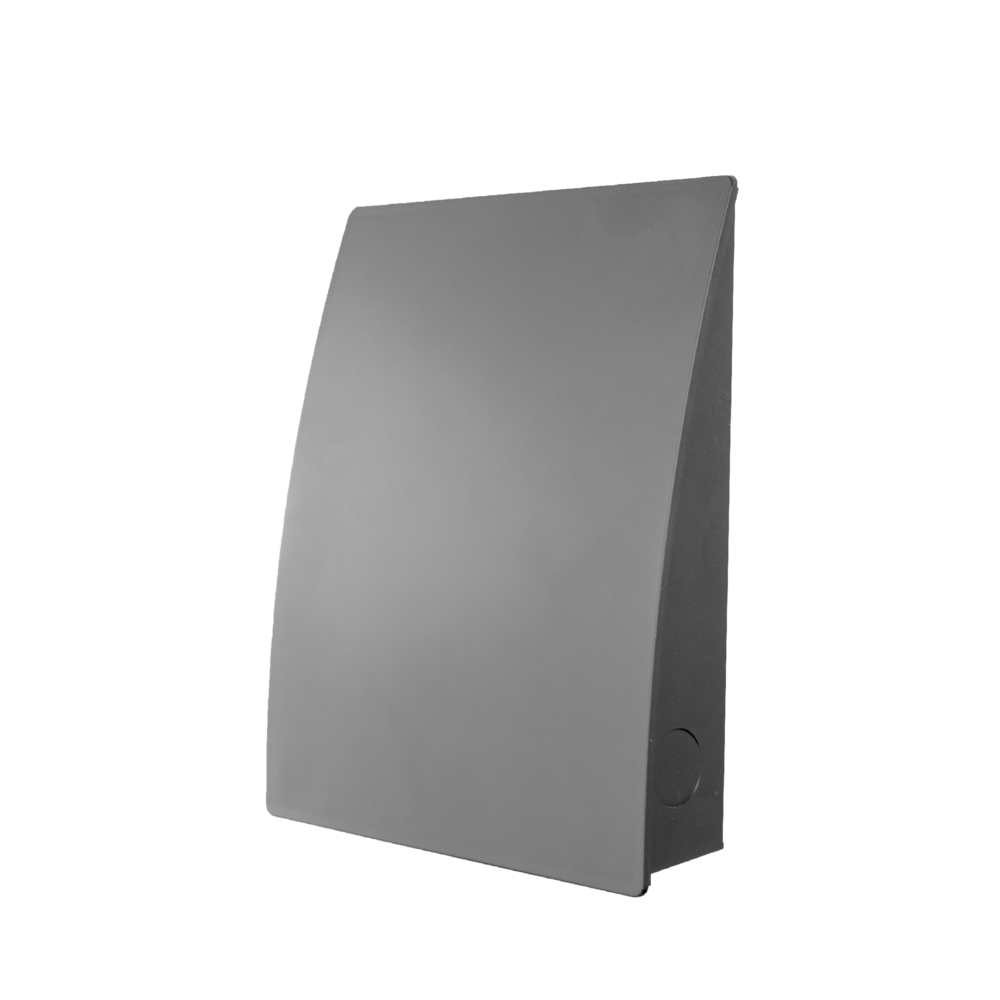
If you want the storm shield for your DUKA ONE in a different colour or design, you can replace it with one of the colours and/or models below.
El connection
ALL ELECTRICAL CONNECTIONS MUST BE CARRIED OUT BY AN AUTHORISED ELECTRICIAN.
CONNECTIONS THAT ARE MODIFIED OR ILLEGAL WILL INVALIDATE THE WARRANTY ON THE PRODUCT
REMOVED.
PLEASE NOTE: IT IS NOT LEGAL FOR PRIVATE INDIVIDUALS TO CARRY OUT THE FIXED INSTALLATION THEMSELVES.
SEE MORE AT THE DANISH SAFETY TECHNOLOGY AUTHORITY AT WWW.SIK.DK
The device must be connected to a single phase AC 100-230 v / 50-60 Hz power supply.
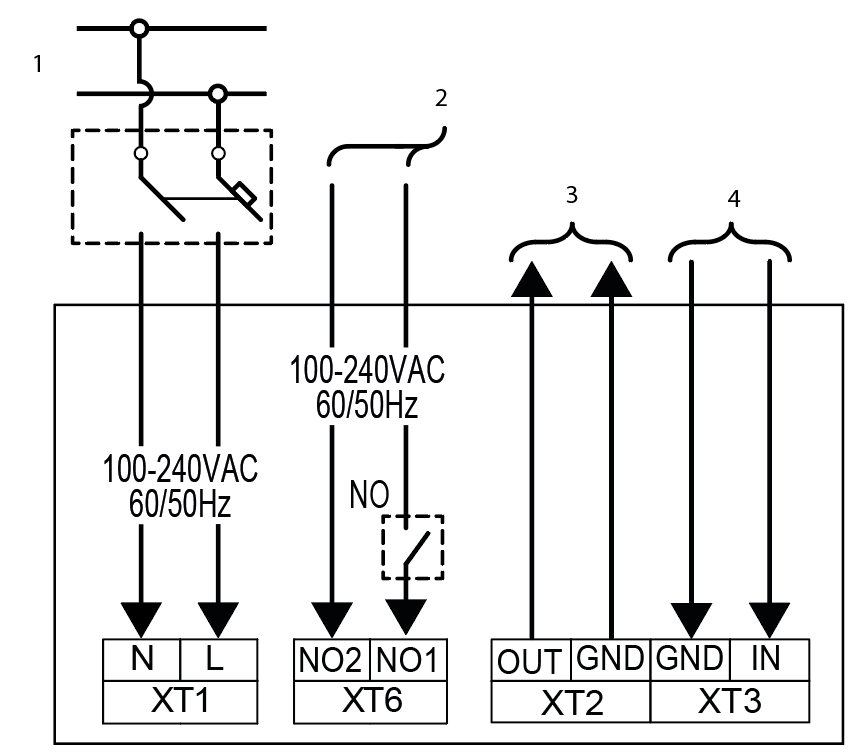
The device must be connected to the mains via the terminal on the circuit board according to the electrical diagram below.
It is possible to connect an external NO switch to the device. When the circuit is closed, the device will start operation on stage III and when the circuit is broken again,
the device will return to the previous speed setting.
The device is also compatible with analogue sensor with 0-10 V output signal.
1 = Power supply 100-240 V ~ 50/60 Hz
2 = NO terminals for control connection (voltage on NO2 terminal activates speed 3)
3 = Control signal to next device
4 = Control signal from previous device
Pairing devices
Interconnecting units in a master/slave relationship provides synchronous operation and balanced ventilation in the home.
It is recommended that 0.25 mm² cable is used for interconnection and that cabling does not exceed 200 metres between devices.
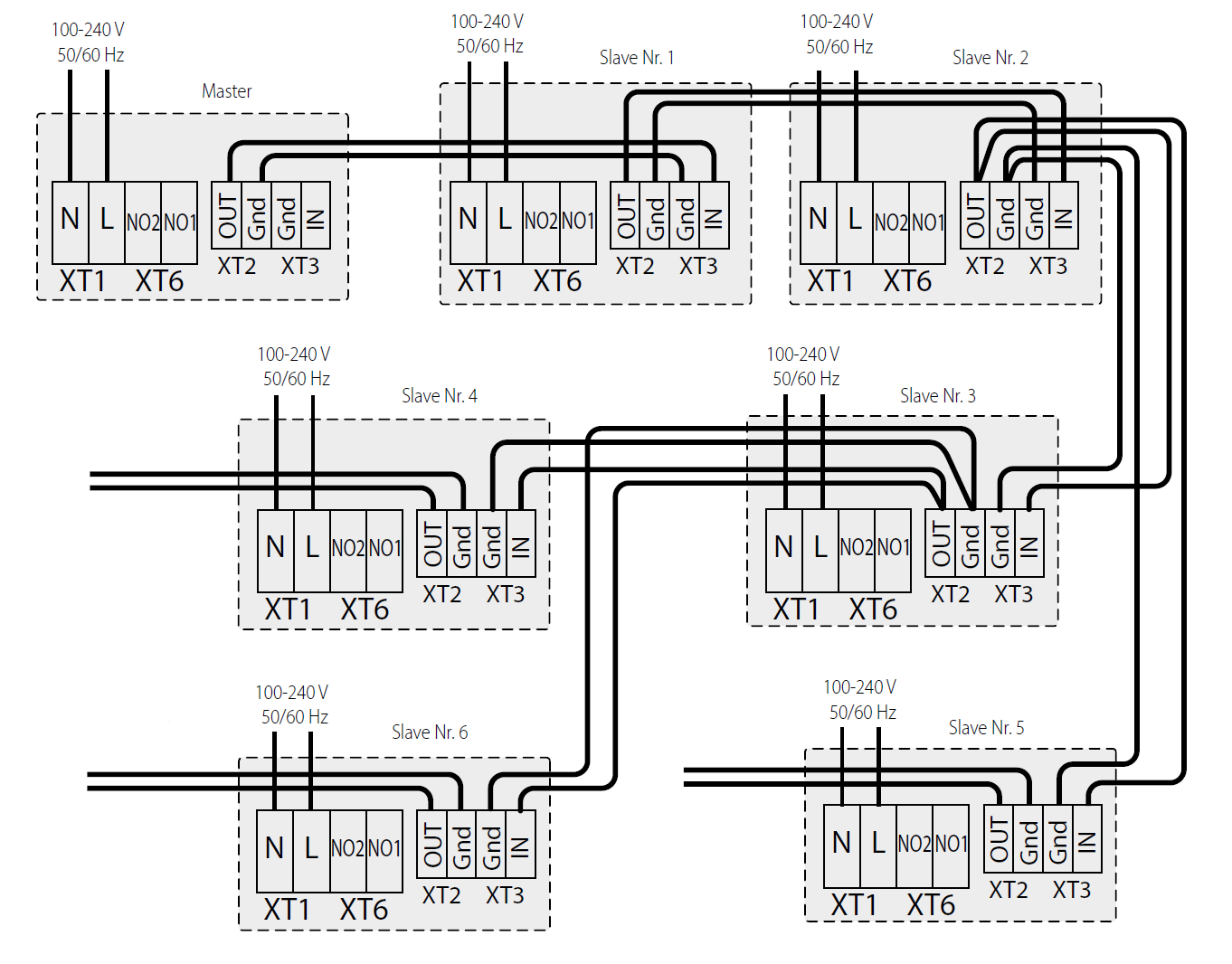
It is not possible to have multiple master units in the same connection. The units must be connected according to the electrical diagrams below.
For interconnected units, only the master unit can be controlled via remote control or on the electronics. Slave units will only
respond to the signal they receive from the master and ignore other signals.
El diagram for possible interconnection of devices
When pairing multiple devices in a master/slave relationship, the master's XT2 terminal must be connected to the slave's XT3 terminal.
The same applies to subsequent devices in the series. It is only possible to have one master unit when connecting multiple units.
It is differentiated in that it does not have a connection to terminal XT3.
El diagram for possible interconnection of devices
Settings and preferences
Before starting up the DUKA One device, the device's
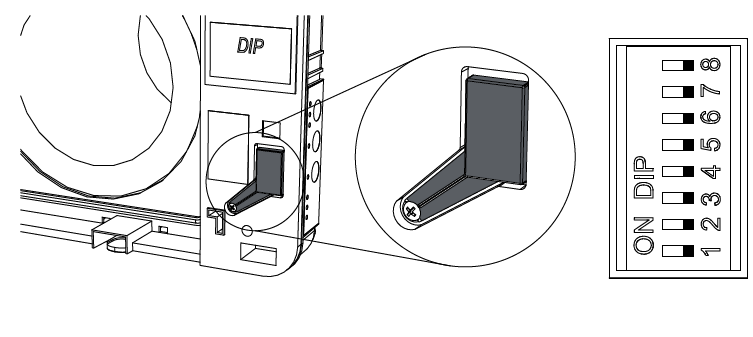
operating settings are customised to your needs. This is done via
The DIP switches located under the DIP switch cover.
DIP 1 - Standby setting
ON - The device cannot be switched off and will operate on stage I in standby mode.
OFF - The device can be switched off and put into standby mode, used if you do not want the device to be put into standby mode. It will only be possible to switch between stages I, II and III on the electronics and by remote control.
DIP 2 - Setting the direction of the device
OFF - The unit will start operation with extraction and will exhaust air in ventilation mode.
ON - The unit will start operation with supply air and will blow air in ventilation mode.
If using multiple devices, it is recommended to set the devices in pairs. Set half of the devices to ’ON’ and the other half to ’OFF’. This setting ensures
Balanced ventilation.
Dip 3,4,5 - Setting the humidity sensor

When the humidity level exceeds the selected humidity level, the unit will switch to forced operation on stage III. When the humidity level is again below the set level, the unit will return to
to the previous operating setting.
DIP 6,7 - Adjusting the after-run

Overrun timer is used together with the humidity sensor. When the humidity sensor is activated and the increased ventilation lowers the humidity level to the selected level, the device's run-on timer is activated at the selected time interval. When the run-on time has expired, the device will return to the previous operating setting.
DIP 8 - Device reset / Filter alarm reset
ON - Filter reset (set back to Default position / Off after 3 seconds)
Off - Standard position / Off.
Operation
FUNCTION | Operating the device via buttons on the indoor unit |
Speed | Set speed step I - II - III - standby I : Light - Step I is active. Blink - Night mode is active. I and II : Light - Step II is active. I, II and III : Light - Step III is active. If all three indicators are flashing, it could be due to the following: The party mode timer is activated, the built-in humidity sensor is activated or a connected external sensor is activated. When diode I, II and III flash alternately, the weekly schedule is activated for the device. When pairing devices in a master/slave relationship, the speed is controlled by the master device. |
Heat recoveryfunction | The unit runs in heat recovery mode - 70 seconds in supply air mode and then 70 seconds in exhaust air mode. |
Ventilationfunction | The device runs in ventilation mode - supply or exhaust mode. The direction depends on the DIP-switch setting, see the Settings section for more information. |
Filter alarm | The filter alarm will sound every 90 days when it's time to inspect the filters, which should either be cleaned or replaced. See the Maintenance section for more information. If multiple units are connected, the master unit's indicator will light up constantly, while the slave to be monitored will have a flashingindicator. The filter alarm can be reset by following the instructions in the Maintenance section. |
Alarm indicator | The indicator lights up or flashes when a fault occurs on the device. If the devices are connected to each other, all devices willstop running. The alarm indicator will flash on the faulty device and light up on the other devices.In case the master device loses connection to the selected network for more than 20 seconds, the alarm indicator will flash andThe device will go into standby. The slaves will signal a lack of connection to the master unit and will start up automatically whenthe master device is switched on again. |
Master indicator | Only the master unit will light up when multiple units are connected. The slave units will not have light in their indicator.If one of the slave devices' indicator flashes, it means that there is no connection to the master device. |
Front cover features and control panel
By clicking the bottom, top or side of the front cover of the device, you can determine the blowing direction.
Note: The device is most effective when it is open on all sides.
NOTE: If the airflow needs to be shut off for safety reasons, the entire front must be closed and the unit switched off periodically.
See more under warranty conditions.
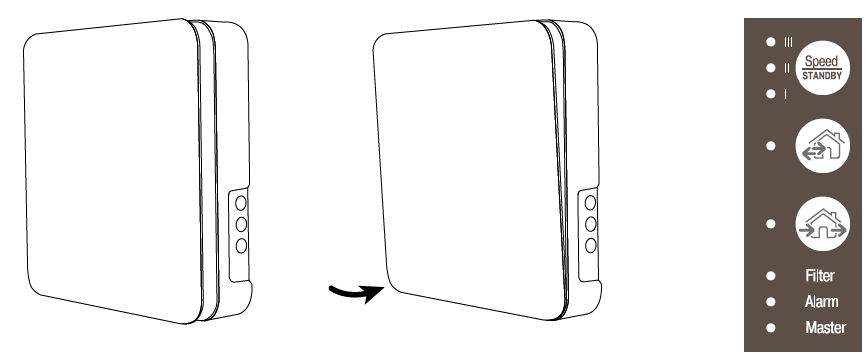
Speed / standby
Heat recovery function
Ventilation function
Function / button
Operating the device with remote control

Switch on or standby
Switches the device on or sits in standby mode unless the function is disabled via DIP-switch settings, see the Settings section for details.

Speed and speed
Step III - II - I

Heat recovery
Unit runs in heat recovery mode - 70 seconds in supply air mode and then 70 seconds in exhaust air mode

Ventilation mode
The device runs in ventilation mode - supply or exhaust mode.
The direction depends on the DIP-switch setting, see the Settings section for more information.

Solid state:
Activation of speed stage III for 4 hours.
Night mode:
Activation of speed stage I for 8 hours.
At the end of the time, the device will return to the previously selected operating mode.
The function is deactivated by pressing any button.
Maintenance
REMEMBER TO DISCONNECT POWER TO THE DEVICE BEFORE PERFORMING MAINTENANCE!
A DUKA One unit must be inspected and maintained at least every 3 months. There may be conditions where it is necessary to
Inspect your device more often, for example in a dusty, dirty or humid environment.
During maintenance, the core must be removed. The core is cleaned while the silencer and filters are cleaned or replaced.
1 - Remove the front cover
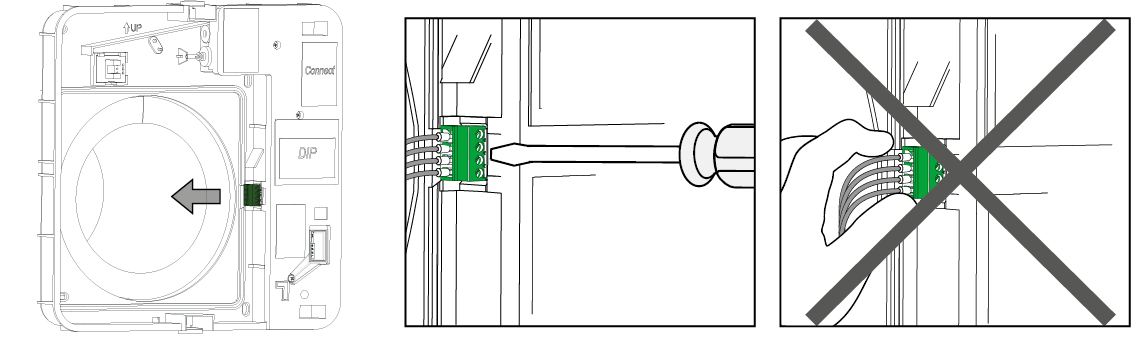
2 - Remove the cable lugs
Carefully remove the cable lug from the electronics unit. Use a flat screwdriver to lift the cable lug free from the cable sleeve. Do not pull on the wires.
3 - Remove the core and silencer from the pipe

4 - Clean filters, core and silencer
Filters
The filters are inspected at least every 3 months, when they should be cleaned or replaced depending on condition. At least once a year, replace the filters with new ones
original filters from DUKA Ventilation. The unit may be installed in an environment where a shorter maintenance interval is required
than the minimum prescribed 3 months. This could be in a dusty, dirty or humid environment, for example.
For installations where there is a risk of mould, the unit must be cleaned especially thoroughly to completely remove dust and any fungal spores. The
It may be necessary to use a special cleaning agent. Failure to do so will invalidate the warranty on the product.
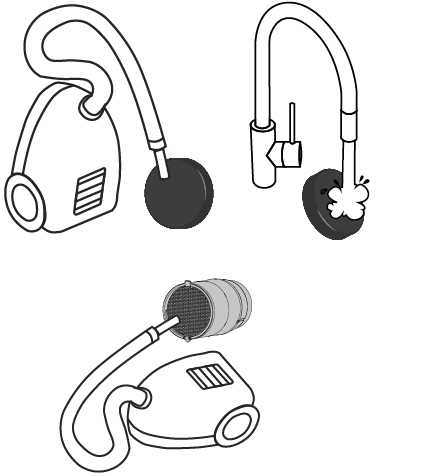
Depending on how clogged or worn the filters are, they can be washed
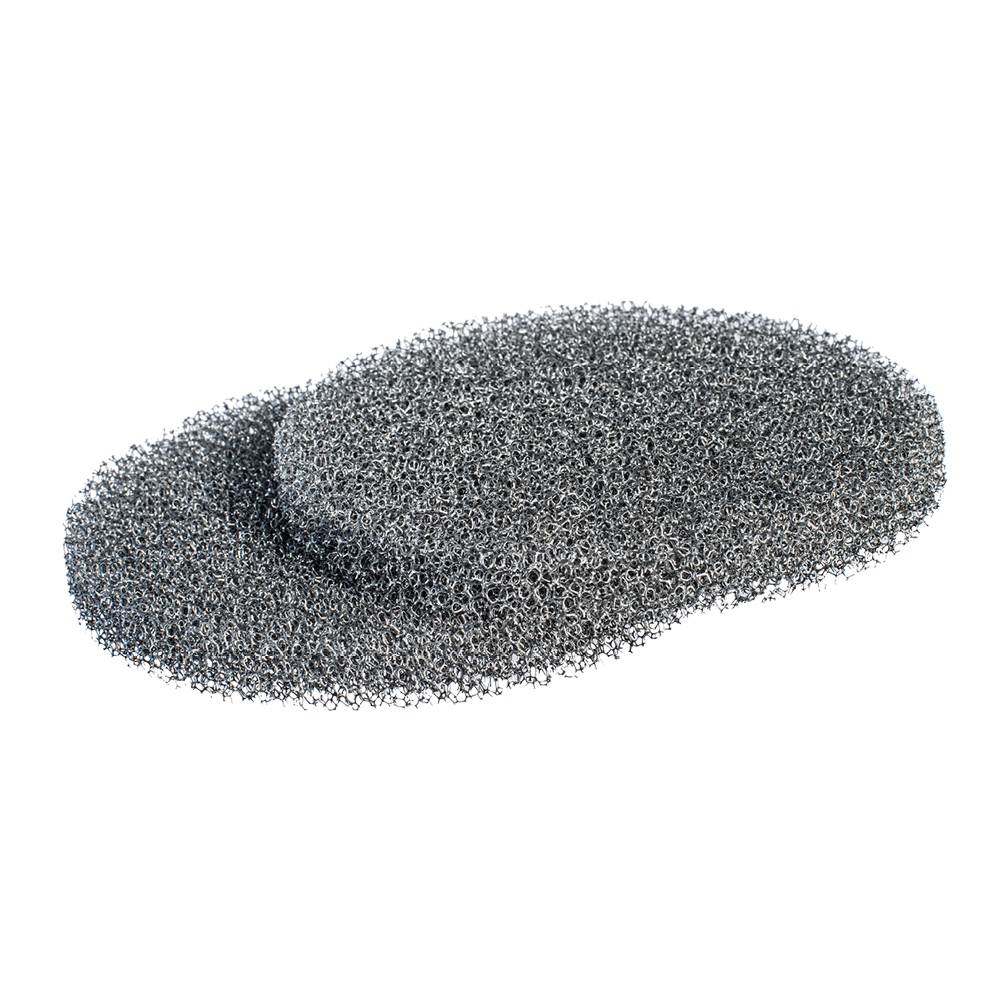
or vacuum cleaned a maximum of 3 times.
Allow the filters to dry before reinstalling them in the device.
To reset the filter alarm, move DIP switch 8 to the ON position in
at least 3 seconds and then to OFF.
Core
Organic particles from the device's surroundings can be deposited in the ceramic
core or on the fan, so it is important to clean these parts as well.
The easiest way to do this is with a vacuum cleaner or compressed air. When using
compressed air, the fan must be fixed so that it does not rotate uncontrollably.
Silencer
The silencer should be cleaned by either vacuuming or washing it
Carefully. Allow the silencer to dry before reinstalling it in the device.
Pipe routing
Clean the pipework with a damp cloth and mild detergent.
DUKA Clean can be used here.
Allow the pipework to dry before reinstalling the core, motor and silencer.
Remote control
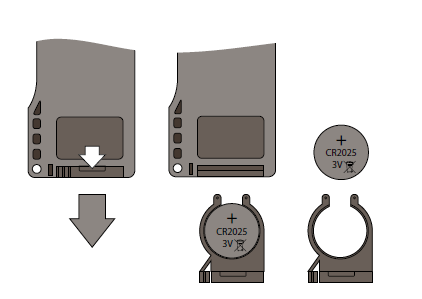
After prolonged use, it may be necessary to replace the battery in the remote control.
Pull the battery drawer out of the remote control to change the battery and insert the new one
Battery.
Battery type: CR 2025
Faults and problem solving
Problem | Possible errors | Troubleshooting |
The device does not start | Power is not connected The motor is blocked or the fan meets resistance | Check that power is connected to the device and that the switch is switched on. Alternatively, ensure that the device is not connected incorrectly Check if the motor is blocked Clean the fan blades. Switch on the device |
Automatic circuit breaker switches on | Short circuit of the electrical network | Switch off the device and contact your dealer |
Low supply air temperature | The filters are clogged The ceramic core is iced up | Clean or replace filters Check the ceramic core for icing Switch off the device, remove the core and let the ice cream melt. |
Low air flow rate | The device is on the lowest setting
Filters, fan or ceramic core are clogged | Select higher speed steps
Clean or change filters
Clean fan and ceramic core |
High sound levels or vibrations | Clean fan Tighten screws | Clean the fan
Tighten screws |
Filter alarm button still lit after filter cleaning/change | Filter alarm reset has not been performed according to the instructions. | See the Maintenance section |
The device is running at full power, all speed LEDs are flashing and not responding to external signals | Humidity control in the DUKA One unit is switched on and activated | Switch off the DUKA One and set the humidity level or switch it off via DIP switch settings. See section Settings. |