






DUKA One C4 User Manual
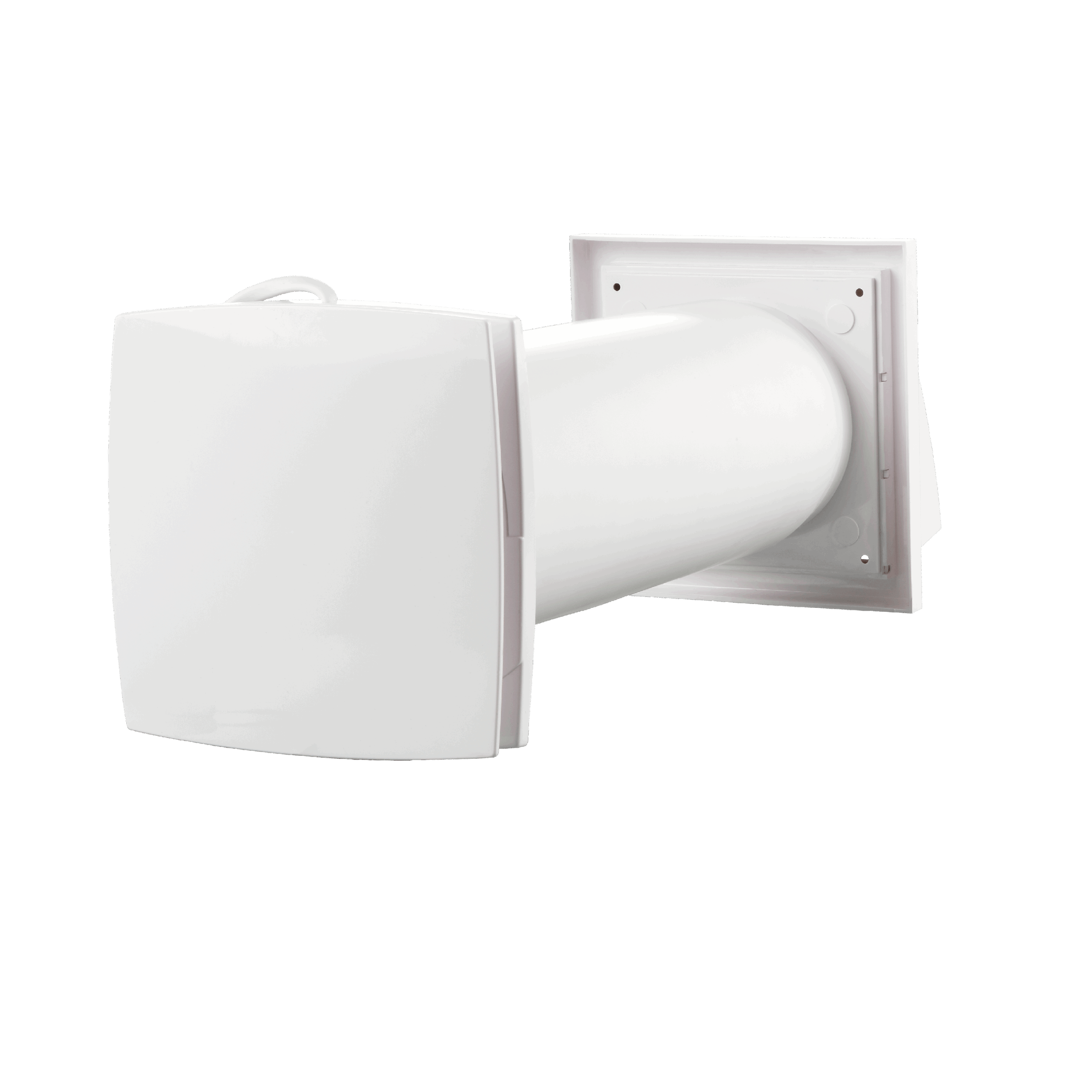
Ventilation unit with heat recovery
Content
Transport and storage and Safety
- The device must be protected against shock, impact and weather conditions during transport.
- The device must be stored in its original packaging in a dry and ventilated room with temperatures between 5°C and 40°C.
- The storage room must not contain aggressive or chemical vapours or gases.
- Do not expose the stored device to pressure or any other form of stress.
How to use
- Only use the device for room ventilation. Do not connect tumble dryers or similar equipment to the device.
- The purpose of the unit is to provide basic ventilation in the home.
- The device may only be switched off if required by the authorities or for safety reasons - for example in case of fire or similar.
- The device cannot be used as a heat source.
- The device cannot be used as a dehumidifier.
- Keep explosive and/or flammable dust/vapour/liquid away from the device.
- The air to the ventilation unit must not contain evaporation of chemicals, coarse dust, soot, oil, adhesive substances, fibrous material, pathogens
or other harmful substances.
- Do not block the device channel when the device is in operation.
- Do not allow air flows from the device to be directed towards open flames or similar.
Before installation
- Read and understand the user manual before installing and using the device.
- Inspect the product for damage to the fan, core, front cover, electronics and outer screen. There must be no foreign objects
as this may damage the device.
- Save the quick guide so you can always quickly and easily access the latest manual via the QR code.
- In case the device changes ownership, please pass on the quick guide.
Mounting
- The unit is for installation in a facade wall.
- Carefully unpack the device.
- When mounting and installing the device, all applicable building, electrical and technical standards must be followed.
- Follow all electrical safety rules when installing the device. See more at the safety authority at www.sik.dk
- If any of the wires to the device become damaged, they must be replaced according to current regulations. See more at the Danish Safety Technology Authority at www.sik.dk
- Do not pressurise the device. Deformation of the device can result in motor blockage and excessive noise.
Operation
- Disconnect power to the device before installation, service, maintenance and repair. Except for filter changes, see section on maintenance.
- Do not use the device outside the specific temperature range indicated.
- Do not operate or service the device, controller or remote control with wet hands or bare feet as this may result in electric shock.
- Do not allow children to operate the device. Children should be supervised so they do not play with the device.
- Improper use of the device or unauthorised modifications are not permitted.
- The device should not be operated by persons with reduced physical, sensory or mental capabilities or lack of experience and knowledge unless they are
supervised or have received instructions on the use of the device from a person responsible for their safety.
Cleaning services
- Do not wash the device in water.
- Protect electrical parts from water.
Warranty terms and conditions
DUKA Ventilation offers a 24-month warranty from the date of purchase, cf. the Danish Sale of Goods Act. In addition, DUKA Ventilation offers an additional 12 months
warranty, provided that all described requirements regarding transport, storage, use, installation, operation, maintenance and warranty regulations are met
complied with.
To maintain the warranty, it must be documented that the filters have been changed at least once a year with DUKA Ventilation original filters.
Therefore, keep the receipts for these purchases.
Note: Depending on the environment, it may be necessary to change the filters more often.
The purpose of the unit is to provide basic ventilation in the home.
The device may only be switched off when required by the authorities or for safety reasons, for example in case of fire or similar.
If the device is installed where there is a risk of mould, the device must be cleaned particularly thoroughly to remove dust and fungal spores. This can be
It is necessary to use a special cleaning agent. Failure to do so will invalidate the warranty.
The warranty does NOT cover:
- The periodic maintenance.
- Device setup, adjustment and disassembly.
The warranty is void if:
- Information regarding transport, storage, use, installation, assembly, operation, maintenance and warranty regulations have not been observed.
- The device is used or placed in wet rooms or environments for which it is not designed.
- The unit has been switched off, with no outside air blockage required by the authorities.
- There is damage caused by the effects of mould.
- Visible damage has been applied to the device.
- The device is connected to a different type of power network than described in the manual.
- Damage occurs due to voltage fluctuations in the power grid.
- Non-original filters have been used in the device.
- Technical components have been added or removed in the device.
- Unauthorised repairs have been made to the device.
- The device is faulty due to force majeure (lightning, fire, flood, earthquake, etc.).
- No receipt can be presented for the purchase.
- The warranty has expired.
For complaints, please fill out our online complaint form at: www.dukaventilation.dk/reklamation
DUKA Ventilation cannot be held liable for warranty obligations performed without prior agreement with DUKA Ventilation.
For other conditions, please refer to Vink Plast's General Terms and Conditions of Sale and Delivery. The latest version can always be found on our website:
www.dukaventilation.dk
Technical Information
The device is designed for indoor use in temperatures from 1°C to 40°C and relative humidity up to 80 %.
The supply and extract air must be between -15 to 40°C.
The device must run continuously.
Electrical apparatus classification: Class II
IP rating: IP 24
The device is under constant development and therefore slight variations may occur in the technical data and user manual. The latest
Documentation can always be found using the QR code on the included Quick Guide or at www.dukaventilation.dk
Contents of the box
• Front cover, electronic parts and motor (assembled component)
• 380 mm pipe
- Mounting cable
Storm screen
- Core
- Mounting kit
- Remote control
Structure
The DUKA One consists of an internal unit with a reversible motor, a ceramic heat exchanger, a wall duct, filters and air deflectors on both sides of the core, as well as an external storm shield. The heat recovery itself takes place in the heat exchanger, which is protected from dust and dirt by the filters.
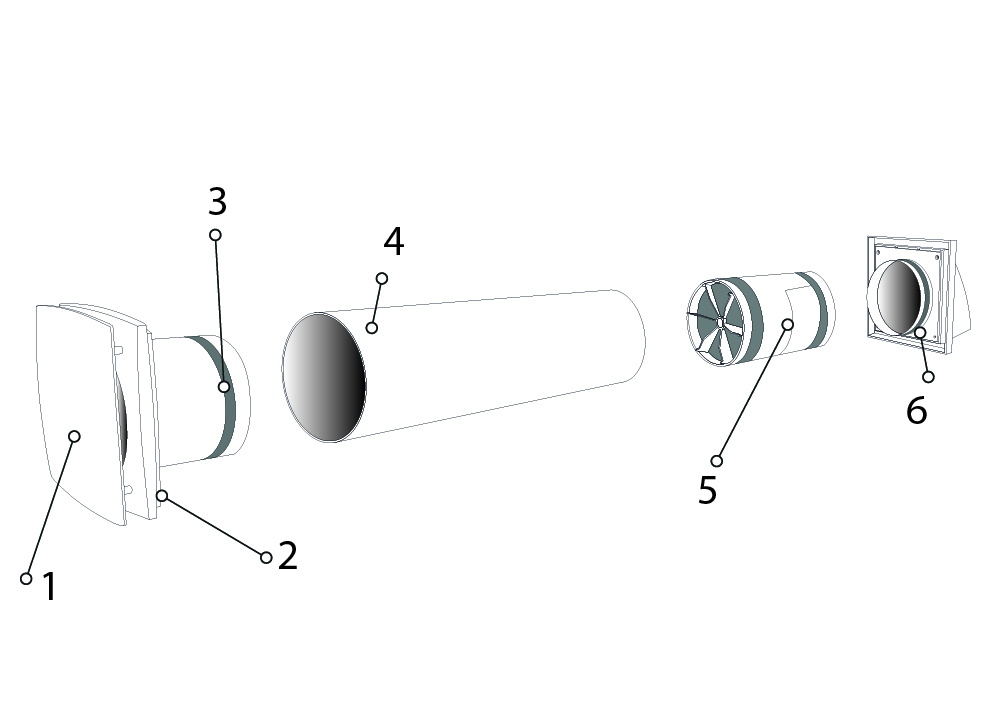
1- Front cover
360-degree supply
2 - 1TP7Electronic part
3 – Motor
Reduces noise from the engine and
From the outside.
4 – Recessed conduit
Must have a 3 mm drop out
to allow condensation to run out
5 – Ceramic core
with dust filter before and after
Recovers up to 90% of
the heat
6 - Storm screen
Available in multiple colours.

Dimensions
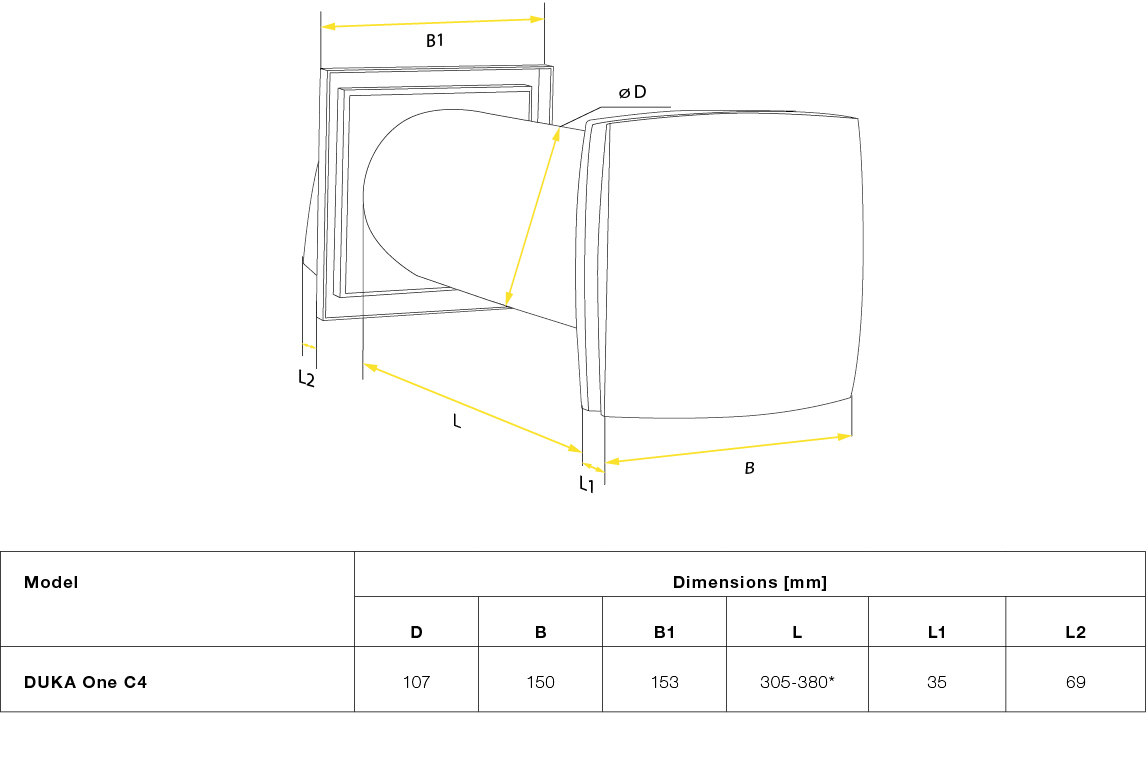
For lengths over 380 mm, 1000 mm extension pipes must be purchased separately.
Minimum wall thickness for fitting DUKA One C4
If the wall thickness is below the minimum requirement, it is recommended to purchase DUKA One Spacer.
Recommended distance between motor and core is 60 mm as this provides optimal heat recovery.
Position of the core in relation to the wall thickness:
Hole diameter (for mounting) 110-120 mm
Minimum wall thickness 305 mm
Mounting
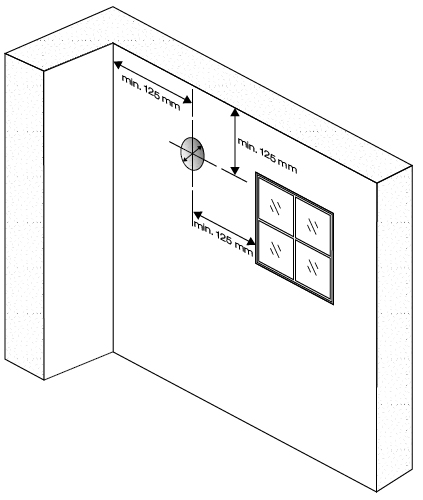
1 - Determine location and drill hole through the wall.
Before positioning the device, make sure to consider the following
Minimum distances to sidewall, ceiling and windows. Minimum distances
is shown in the drawing.
Don't forget to take into account the power supply for the device
when choosing a location.
For basement installation, it is recommended that the DUKA One unit
Positioned so that there is at least 0.3 - 0.5 m from the underside
of storm shield to terrain.
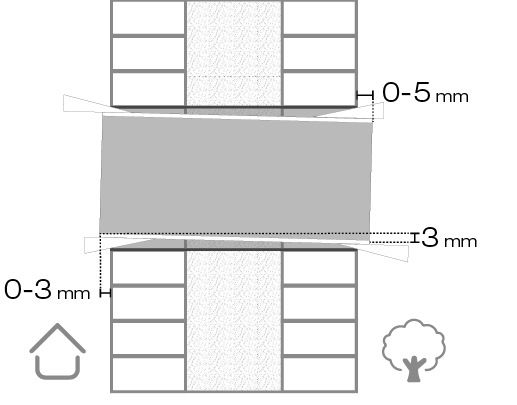
2 - Place the pipe in the hole and adjust the length to the wall thickness.
It is important that the pipe is installed with the prescribed drop of
3 mm, as it ensures that any condensation runs off
away from the electrical components of the device and out to
Storm shield.
For easy installation, it is recommended to use the included
polystyrene wedges.
The pipe must not protrude more than 3 mm on the inside and
5 mm on the outside.
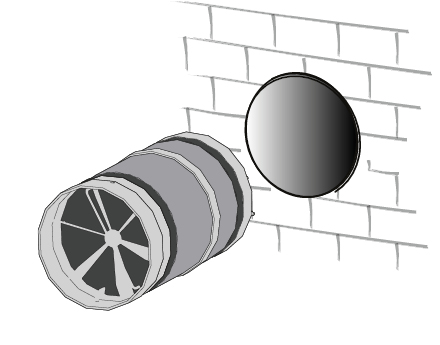
3 – Place the core in the wall penetration
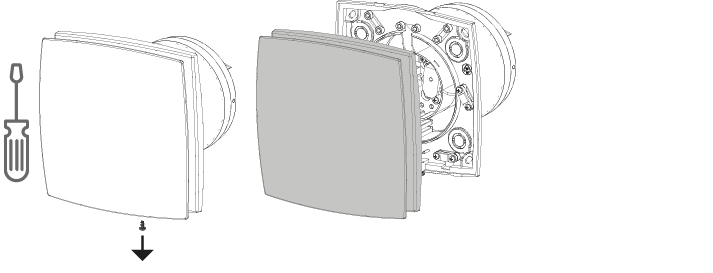
4 – Use a screwdriver to remove the front cover.
5 – Fit the ventilation part
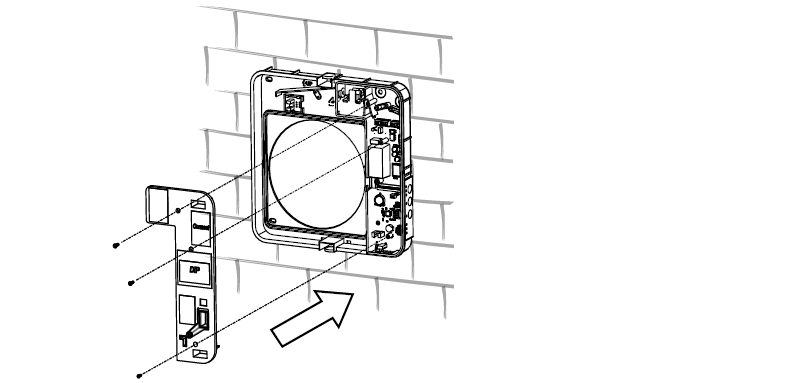
Use the provided template to mark where the mounting holes should be drilled. Drill the holes and insert the plugs.
Mount the mounting plate and fix it to the wall. Attach the fan to the mounting plate.
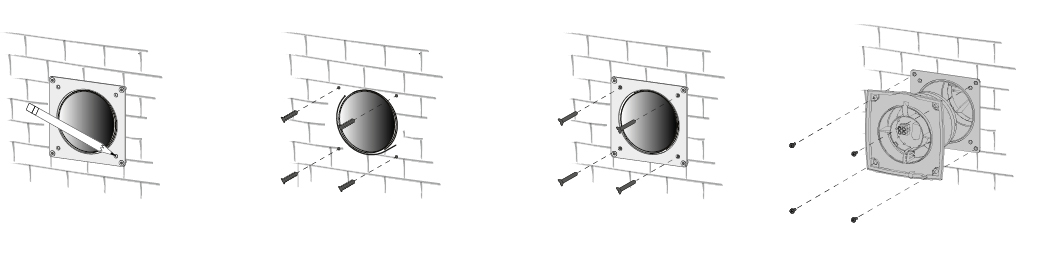
6 – Attach the front to the fan section and secure it with the screw.
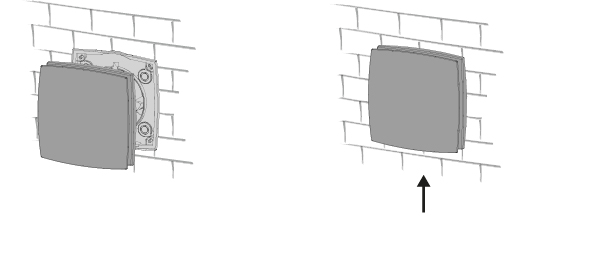
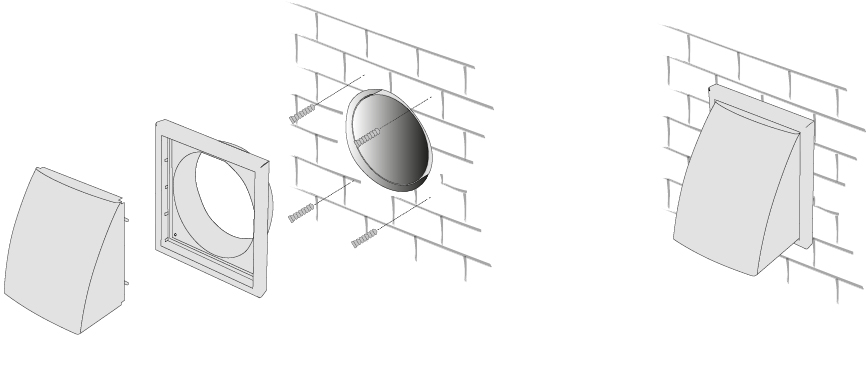
7 – Install the storm screen
7 - After connecting the device's power supply, mount the cover plate.
If you want the storm shield for your DUKA ONE in a different colour or design, you can replace it with one of the colours and/or models below.


El connection
ALL ELECTRICAL CONNECTIONS MUST BE CARRIED OUT BY AN AUTHORISED ELECTRICIAN.
CONNECTIONS THAT ARE MODIFIED OR ILLEGAL WILL INVALIDATE THE WARRANTY ON THE PRODUCT
REMOVED.
PLEASE NOTE: IT IS NOT LEGAL FOR PRIVATE INDIVIDUALS TO CARRY OUT THE FIXED INSTALLATION THEMSELVES.
SEE MORE AT THE DANISH SAFETY TECHNOLOGY AUTHORITY AT WWW.SIK.DK
The unit must be connected to a single-phase AC 100-230 V / 50-60 Hz power supply using the cable the unit is equipped with from the factory.
Important! The unit must not be connected to a speed controller of any kind, e.g. thyristor, autotransformer or frequency. The unit must be connected to a
Stationary power supply via an integrated switch with a contact separation of at least 3 mm on all poles.
The unit is equipped with an electric motor that has two fixed speeds.
The unit is connected to the mains via a power cord with a mains plug.
Settings and preferences
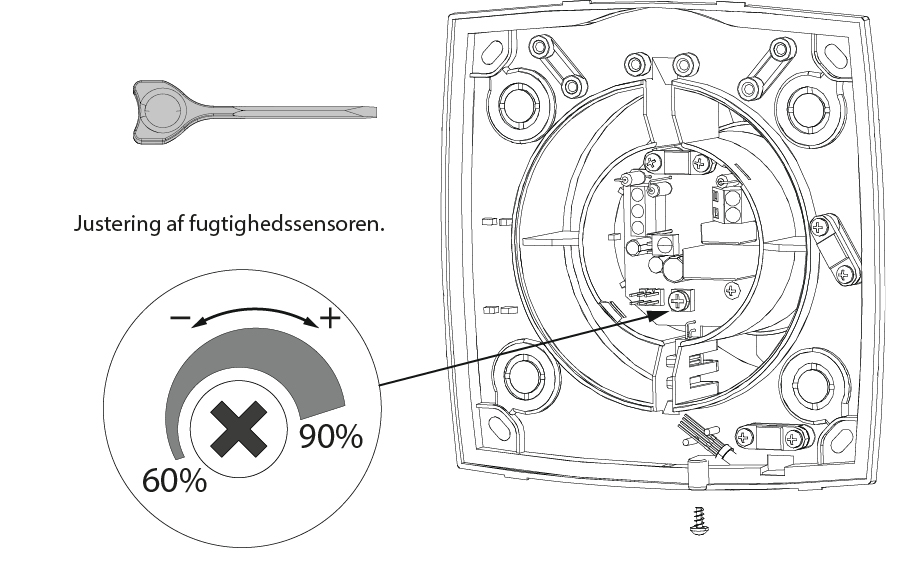
Remember to turn off the power to the device before adjusting the humidity sensor.
The humidity sensor can be adjusted on the control panel using the supplied screwdriver.
Important! A metal screwdriver, knife or similar item must not be used to adjust the humidity sensor, as this can cause damage.
The control panel.
Operation
Operation
The unit is operated with the supplied remote control.
The internal screen is equipped with a coloured LED that indicates the ventilation speed the unit is operating at:
Green: Speed 1 (low speed)
Blue: Speed 2 (high speed)
When operating settings are made with the remote control, this is confirmed on the interior by the diode briefly dimming.
If the unit is turned on/off with the button on the remote control, the unit will start up at the same speed as it was when it was turned off.
The unit will switch to speed II upon moisture impact.
When night mode is activated, the fan will run at speed I for 8 hours. While night mode is active, the unit will not activate the humidity sensor. The diode on the front will be dimmed.
When night mode expires, the device will revert to its previous operating setting. Night mode can be deactivated at any time using the remote control.
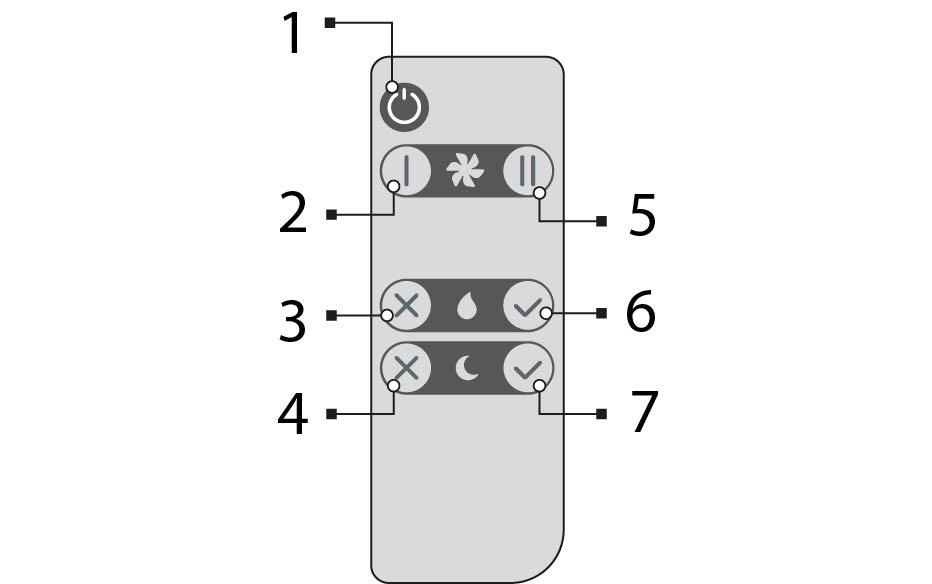
- Power on/off the device
- Active speed 1 (low)
- Disable humidity sensor
- Disable night mode
- Active speed 2 (high)
- Active humidity sensor
- Activate night mode
Maintenance
REMEMBER TO DISCONNECT POWER TO THE DEVICE BEFORE PERFORMING MAINTENANCE!
A DUKA One unit must be inspected and serviced at least every three months. There may be circumstances in which it is necessary to inspect the unit more frequently, for example in a dusty, dirty or damp environment.
The following is performed to service and maintain the unit:
Remove the screw on the front of the internal screen.
Remove the four screws securing the fan to the mounting plate, and detach the fan from the wall opening.
Remove the core from the wall penetration.

The filters should be inspected at least every 3 months, where they should be cleaned or replaced depending on condition. At least once a year, the filters must be replaced with new original filters from DUKA Ventilation. It may occur that the unit is installed in an environment where a shorter maintenance interval than the minimum prescribed 3 months is required. For example, this could be in a dusty, dirty or humid environment.
For installations where there is a risk of mould, the device must be cleaned particularly thoroughly to completely remove dust and any fungal spores. It may be necessary to use a special cleaning agent. Failure to do so will invalidate the warranty on the product.
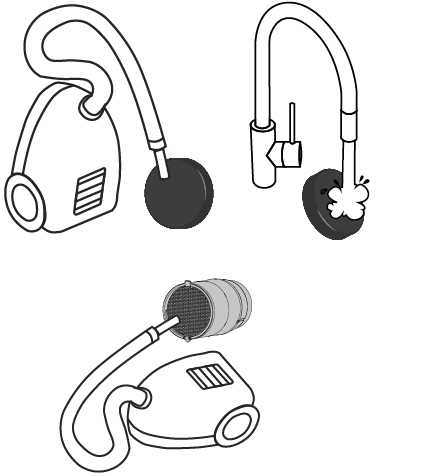
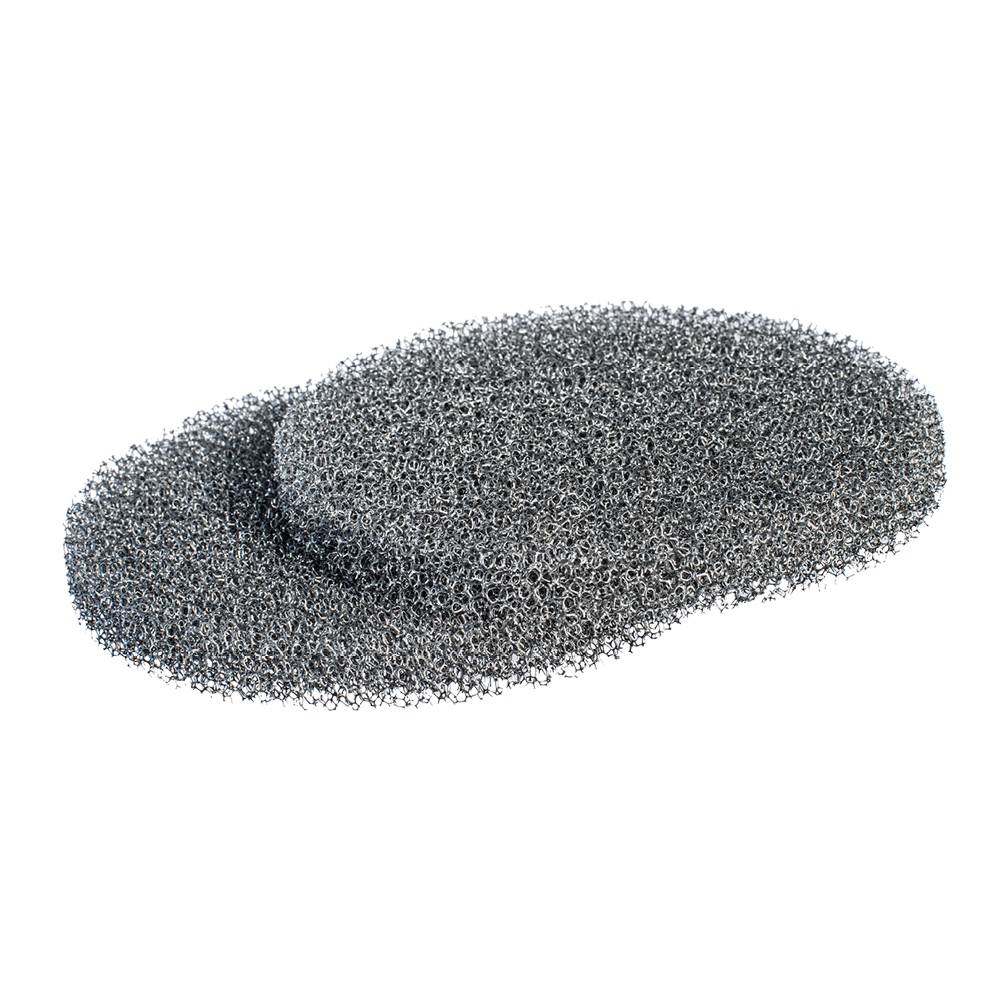
Depending on how clogged or worn the filters are, they can be washed or vacuumed, but a maximum of 3 times.
Allow the filters to dry before reinstalling them in the device.
Core
Organic particles from the unit's surroundings can settle in the ceramic core or on the fan, so it is important to clean these parts as well.
This is easiest done using a vacuum cleaner or with compressed air.
Air splitter
Clean the air splitters on both sides of the core with a damp cloth. Allow to dry before refitting into the unit.
Pipe routing
Clean the pipework with a damp cloth and mild detergent.
DUKA Clean can be used here.
Allow the pipework to dry before refitting the core and engine.
Replacing the battery in the remote control
If the unit does not respond when the remote control is used,
Is it time to change the battery.
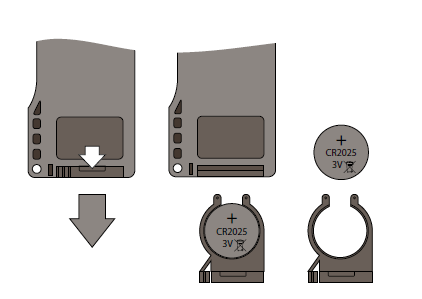
Pull the battery tray out of the remote control to change the battery.
CR 2025 battery
Insert the new battery into the compartment and push it back into the remote control.
Faults and problem solving
Problem | Possible errors | Troubleshooting |
The device does not start | Power is not connected The motor is blocked or the fan meets resistance | Check that power is connected to the device and that the switch is switched on. Alternatively, ensure that the device is not connected incorrectly Check if the motor is blocked Clean the fan blades. Switch on the device |
Automatic circuit breaker switches on | Short circuit of the electrical network | Switch off the device and contact your dealer |
Low supply air temperature | The filters are clogged The ceramic core is iced up | Clean or replace filters Check the ceramic core for icing Switch off the device, remove the core and let the ice cream melt. |
Low air flow rate | The device is on the lowest setting
Filters, fan or ceramic core are clogged | Select higher speed steps
Clean or change filters
Clean fan and ceramic core |
High sound levels or vibrations | Clean fan Tighten screws | Clean the fan
Tighten screws |
Filter alarm button still lit after filter cleaning/change | Filter alarm reset has not been performed according to the instructions. | See the Maintenance section |
The device is running at full power, all speed LEDs are flashing and not responding to external signals | Humidity control in the DUKA One unit is switched on and activated | Switch off the DUKA One and set the humidity level or switch it off via DIP switch settings. See section Settings. |